Restaurant inventory management that puts a money figure on every loss.
Stock goes down by itself as dishes sell. Count a shelf and Bhookly tells you what is missing in units and in money, who moved it, and what to order before you run out.
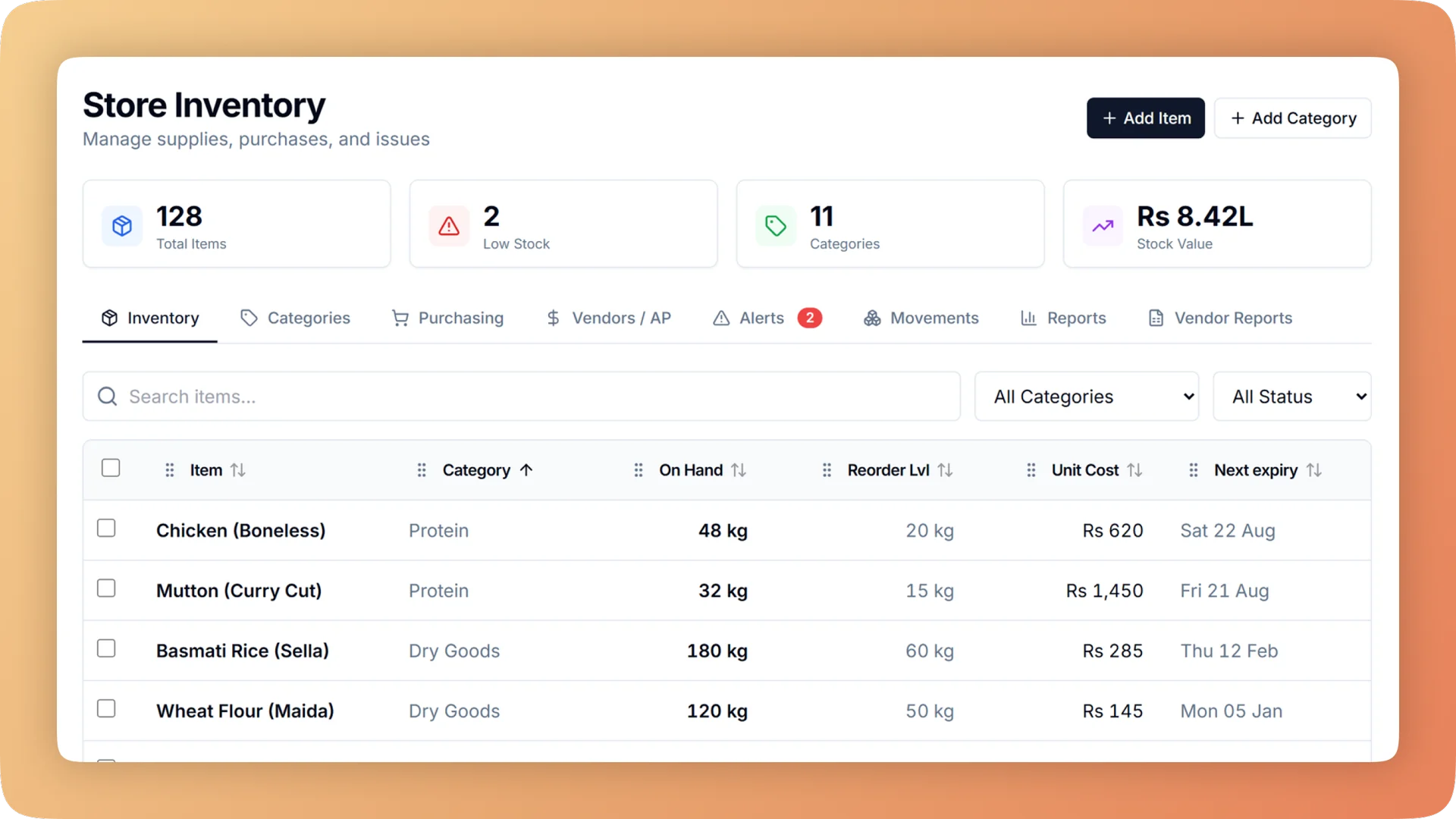
Store Inventory on a live shift.
Restaurant inventory management that deducts ingredients as each bill is paid, turns every count gap into a money figure and suggests what to reorder.
- Every paid bill deducts its recipe ingredients from stock, with nobody keying usage
- Count an item and see the gap in units and in money, for example "about Rs 900 missing"
- Low-stock items grouped by supplier with days of cover and a suggested quantity; one tap creates the order
- Each delivery carries its own expiry date, and the earliest is always used first
- Stock reports split losses into waste, missing at count and dishes thrown away, with Excel export
What you get with Store Inventory.
- Stock that updates as you sell
- When a bill is paid, each ingredient in the recipe leaves stock, down to the takeaway cup. A stock problem never blocks a sale, so the queue keeps moving and the numbers catch up behind it.
- A count that speaks in money
- Enter what is on the shelf. Bhookly shows the gap in units and in rupees, then sets stock to the count. Theft and leakage stop being a feeling and become a figure.
- Reordering in minutes
- Items that need attention are grouped by supplier, each with usage per day, days of cover and a suggested quantity. One tap turns the list into a purchase order.
- Expiry dates that protect money
- Every delivery has its own date and the earliest is used first. Alerts show the money at risk before the date passes, and an expired batch is written off at what it really cost.
- Safeguards against typing mistakes
- Units are locked once an item is in use, and a large opening value needs a tick to confirm. At one café, a single typo once made up 81% of the stock value on the books.
- Losses separated by cause
- Stock reports show what stock is worth, what was used and what is being lost: waste, missing at count and dishes thrown away. Each cause has its own line, so you know which problem to fix first.
Everything Store Inventory does.
Used by owners, storekeepers, inventory managers and accountants.
Stock items and setup
Set up once, with guards that keep a typing mistake from poisoning every later number.
- Automatic deduction from sales
- Each paid bill removes its recipe ingredients from stock. If a stock figure is wrong or missing, the sale still goes through.
- Stock items with safeguards
- An item's unit is locked once it has been used, and an unusually large opening value must be confirmed with a tick before it saves.
- Items list with one next step
- Every item shows a plain status (low, out, oversold or on order) and a single button for what to do about it.
- "Used in"
- Open an ingredient to see every dish that uses it and the amount per serving. It answers "why does this keep going down?"
- Bulk import from Excel
- Load hundreds of stock items from one spreadsheet. Every row is checked before anything is saved.
- Barcodes and scanning
- Give an item several barcodes with their pack sizes, then scan to find or count it. An unknown code is looked up automatically.
Counting, issuing and the record
Every unit that leaves the shelf has a reason and a name against it.
- Count an item
- Type what is on the shelf. The gap appears in units and in money, and stock is set to the count.
- Issue stock
- Record stock leaving for staff meals, cleaning or any other use, optionally against the person who took it.
- Adjust for spoilage and returns
- Write stock down for spoilage or a return to the supplier, each with its reason on the record.
- Stock history in plain words
- Every movement is listed with who did it, written the way you would say it: "Wasted, spoilage", "Issued to Ali, staff use".
- Separate store and kitchen stock
- Stock can live in named places and move only through a recorded request, so a shortage points to the storeroom, the hand-off or the line. Production Planning covers the kitchen side.
Running low and going out of date
Two alerts that matter: what will run out, and what will expire.
- Low-stock alerts
- Items below their level appear in one list inside Bhookly, with usage per day and days of cover.
- Reorder suggestions by supplier
- The list is grouped by supplier with a suggested quantity for each item. One tap creates the purchase order.
- Expiry date per delivery
- Each delivery of an item keeps its own date, and sales draw from the earliest date first.
- Money at risk before expiry
- Expiry alerts show the value of the stock about to go out of date, while there is still time to use it.
- Write off an expired batch
- An expired batch is written off at the price that batch was bought for, and counted as a loss in the reports.
Stock reports and stock value
Four questions answered: what is it worth, what was used, what was lost and what needs attention.
- Stock value
- What the stock on the shelves is worth today, item by item.
- Usage
- What was used over any period, driven by the recipes of the dishes that sold.
- Losses by cause
- Waste, stock missing at count and dishes thrown away are reported on separate lines, each in money.
- Needs attention
- Low, out, oversold and expiring items in one report, ready to act on.
- Excel export
- Every stock report exports to Excel for the owner or the accountant.
- Stock buys are not counted twice
- Stock becomes a cost when it sells, not when it is bought, so a large delivery does not sink that day's profit.
“Setup took less than a morning. By dinner service we were fully live. I've onboarded three POS systems over the years — this is by far the fastest I've ever seen a team get comfortable.”
Things people usually ask us.
Still have a question? Message us and we reply the same day.
Does stock update automatically when a dish is sold?
Yes. In Bhookly, each ingredient in a dish's recipe leaves stock the moment the bill is paid, including takeaway packaging when the order leaves the building. Nobody has to key in usage at the end of the day, and a stock problem never blocks a sale.
How do I find out if stock is going missing?
Count the item and Bhookly shows the gap in units and in money. A count that comes up short reads, for example, "about Rs 900 missing", stock is set to the real figure, and the gap lands in the stock loss report as missing at count, separate from waste.
Can Bhookly tell me what to reorder and how much?
Yes. Bhookly lists the items that need attention, grouped by supplier, with usage per day, days of cover and a suggested quantity. One tap turns a supplier's group into a purchase order.
Does the inventory track expiry dates?
Yes. Bhookly gives each delivery its own expiry date and always uses the earliest first. Alerts show the money at risk before the date passes, and an expired batch can be written off at its real cost so it is counted as a loss.
What happens if someone enters the wrong unit or quantity?
Bhookly locks an item's unit once it is in use and asks for a tick to confirm a large opening value. These guards exist because of real mistakes: at one café a single typo made up 81% of the stock value before it was caught.
Can I see who took stock out and why?
Yes. Bhookly records every stock movement with the person and the reason in plain words, such as "Issued to Ali, staff use" or "Wasted, spoilage". Staff meals, cleaning supplies, spoilage and returns to a supplier each have their own reason.
Can I track stock for more than one store, kitchen or branch?
Yes. Bhookly tracks inventory per branch, with a consolidated view in the manager dashboard. Inside a branch, stock can be held in named places such as the store and the kitchen, and it moves between them only through a recorded request.
Can I load my existing stock list and use a barcode scanner?
Yes. Bhookly imports stock items from an Excel sheet and checks every row before saving. Items can carry several barcodes with pack sizes, and a USB scanner finds or counts an item in one scan.
Works with the rest of Bhookly
Let's get your restaurant running on Bhookly.
چلیں، شروع کریں
Book a 20-minute demo. We'll show you Bhookly running on your kind of restaurant, with no pressure and no obligation.
- No lock-in contracts
- Live in a morning
- Same-day WhatsApp support