A WhatsApp ordering system for restaurants, by message or voice note.
Customers message your restaurant the way they message a friend, in their own language, typed or spoken. Bhookly's assistant builds the order from your live menu, confirms it with the customer and places it into the same inbox as your website and table QR orders. Nobody has to sit on the phone.
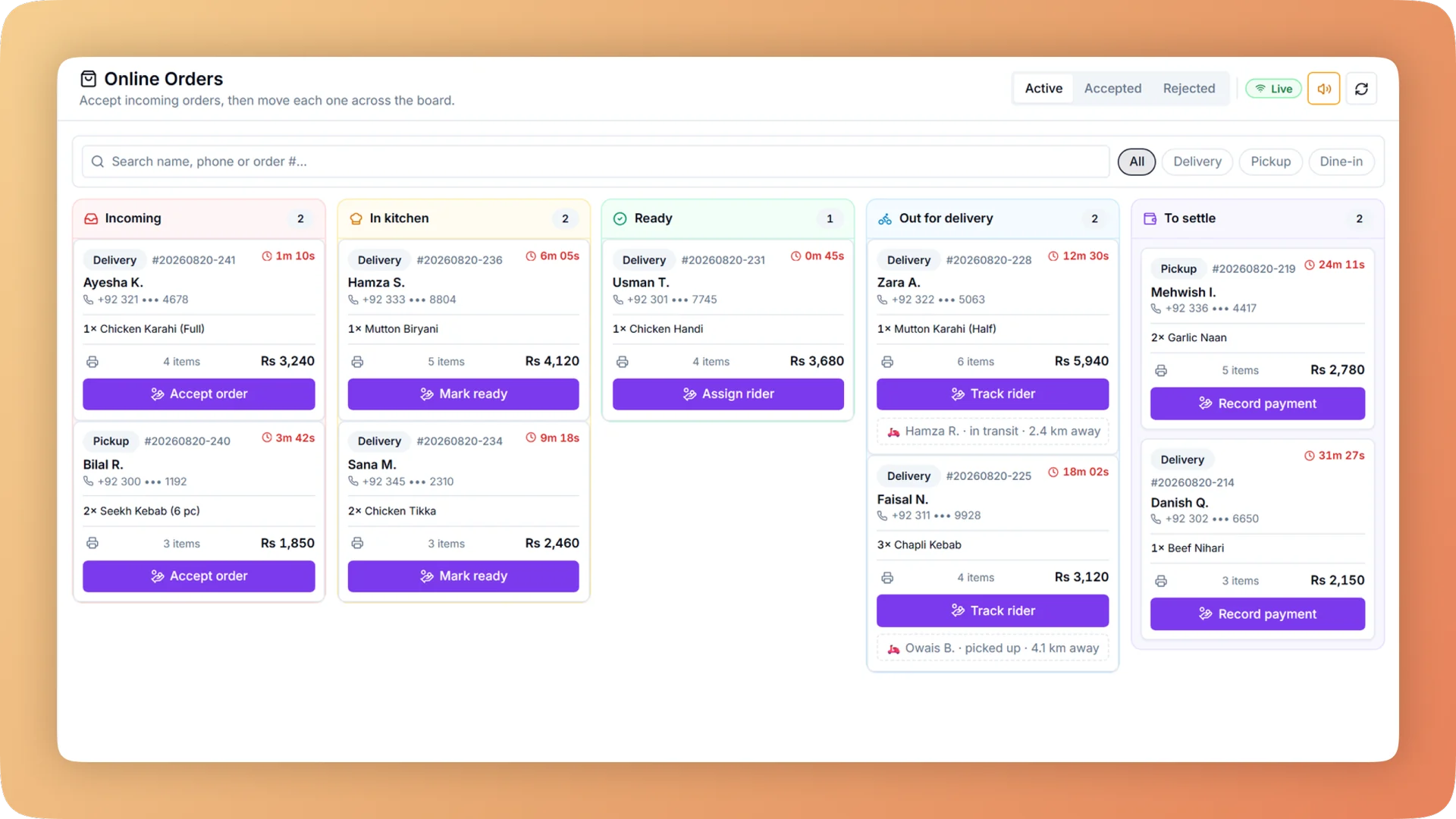
WhatsApp Ordering on a live shift.
Customers order on WhatsApp by message or voice note in English, Urdu, Roman Urdu or Hindi. An AI assistant builds the order and places it in your till inbox.
- An AI ordering assistant that understands English, Urdu, Roman Urdu and Hindi
- Voice notes are transcribed and handled like text, and the customer gets an Urdu voice reply
- Your menu inside WhatsApp's own catalogue, with a cart customers fill without leaving the chat
- Orders land in the till inbox beside web and QR orders: Accept sends to the kitchen, Reject sends a reason
- Confirmed, ready, rejected and out-for-delivery messages sent back to the same chat
What you get with WhatsApp Ordering.
- Orders taken where your customers already are
- Most of your customers already have WhatsApp open. They message your number, say what they want, and the assistant takes the order. There is no app to download, no account to create and no link to find first.
- In their own language, typed the way they type
- The assistant reads English, Urdu, Roman Urdu and Hindi. "2 zinger aur 1 fries, delivery" is understood as an order, matched to the dishes on your menu and read back to the customer for confirmation before anything is placed.
- A voice note is an order too
- Customers who would sooner speak than type send a voice note. Bhookly transcribes it and handles it exactly like a typed message, then answers with an Urdu voice reply. This serves the customers who used to phone, without tying up a member of staff.
- Built from the live menu, so it cannot sell what is gone
- The assistant builds every order from the menu as it stands on the till right now, with current prices, sizes and add-ons. Mark an item sold out in Bhookly and it shows as out of stock on WhatsApp as well.
- Same inbox, same kitchen, same reports
- A WhatsApp order arrives on the till with a repeating chime, next to website and table QR orders. Staff accept it and it routes to the kitchen stations like a counter sale. It is counted in reports and in the nightly close with everything else.
- The chat keeps the customer informed
- The customer hears back in the conversation they started: order confirmed, food ready, out for delivery, or rejected with a reason. The ready message is sent when the cook marks the ticket done, so it reflects the kitchen and not an estimate.
Everything WhatsApp Ordering does.
Used by owners, managers, cashiers and customers.
The ordering assistant
An AI assistant on your restaurant's WhatsApp number that takes a complete order in conversation.
- Four languages
- Customers message in English, Urdu, Roman Urdu or Hindi, including Urdu typed in English letters, and the assistant answers in the conversation.
- Orders built from the live menu
- The assistant matches what the customer asked for against your current menu, including sizes, required choices and paid add-ons.
- Confirmation before placing
- The assistant reads the full order back and places it only after the customer confirms, so a misheard item is caught in the chat.
- Voice-note ordering
- A voice note is transcribed and handled like a typed message. Customers who prefer speaking order without typing a word.
- Urdu voice reply
- A customer who sends a voice note gets a spoken reply in Urdu, so the whole exchange can happen by voice.
The menu inside WhatsApp
For customers who would sooner tap than talk, the menu itself lives in the chat.
- WhatsApp catalogue sync
- Your Bhookly menu syncs to WhatsApp's own catalogue, so dishes, photos and prices appear inside the app customers already use.
- Cart in the chat
- Customers add dishes to a cart inside WhatsApp and send it as an order. Nothing opens in a browser.
- Sold-out items
- An item switched off for today in Bhookly shows as out of stock on WhatsApp, so the chat does not sell what the kitchen cannot make.
- One menu to maintain
- Prices, photos and options are edited once in Bhookly's menu management. The till, the website and WhatsApp all read from that menu.
From the chat to the kitchen
A WhatsApp order is handled by the same people and screens as every other order.
- Online orders inbox
- WhatsApp orders arrive on the till with a repeating chime, in the same inbox as website and table QR orders.
- Accept or reject
- Staff accept each order, which sends it to the kitchen display or kitchen printer. Reject sends the customer the reason in the chat.
- Order status messages
- Confirmed, ready, rejected and out-for-delivery messages go to the customer for every order that began on WhatsApp.
- "Food is ready" on bump
- When the cook marks the ticket done on the kitchen display, the WhatsApp customer gets the ready message and the counter sees a notice.
- Bill summary on WhatsApp
- After payment the guest receives a message with the bill total, a paperless record in the chat they already have.
- Customer capture
- The person who ordered joins your customer directory with their order history, alongside walk-ins and website customers.
WhatsApp beyond ordering
The same channel carries your marketing and your buying. These are covered in full on their own pages.
- Click-to-send campaigns
- Without a WhatsApp business number, a campaign opens a prepared chat for each guest and you press send. WhatsApp marketing works on day one. See the marketing suite.
- Pre-approved templates
- 18 marketing messages are approved once and shared by every Bhookly restaurant, with a monthly allowance meter, so there is no template paperwork and no surprise bill.
- Purchase orders by WhatsApp
- An approved purchase order is sent to the supplier by WhatsApp from the purchasing screen, or printed as a slip.
- WhatsApp consent per customer
- Each customer profile carries a WhatsApp consent switch, so marketing messages go only to guests who should receive them.
“The table layout builder alone saved us from so much confusion during peak hours. And the analytics finally gave us a real picture of what's actually selling versus what we think is selling.”
Things people usually ask us.
Still have a question? Message us and we reply the same day.
Can customers order from my restaurant on WhatsApp?
Yes. With Bhookly, customers message your restaurant on WhatsApp and an AI ordering assistant builds the order from your live menu, confirms it with the customer and places it into the orders inbox on your till. They can also fill a cart from your menu inside WhatsApp's own catalogue.
Which languages does the WhatsApp ordering assistant understand?
Bhookly's WhatsApp ordering assistant understands English, Urdu, Roman Urdu and Hindi. Customers write the way they normally do, including Urdu typed in English letters, and the assistant matches the request to the dishes on your menu.
Can customers order by voice note?
Yes. Bhookly transcribes a WhatsApp voice note and handles it like a typed order, then answers with an Urdu voice reply. Customers who prefer speaking to typing can place a full order without writing anything.
Where do WhatsApp orders arrive?
WhatsApp orders arrive in the online orders inbox on the Bhookly till, with a repeating chime, beside website and table QR orders. Staff tap Accept to send the order to the kitchen, or Reject to send the customer a reason.
Do customers need to install an app or sign up?
No. Customers order from a Bhookly restaurant inside WhatsApp, which they already have. There is no app to install and no account to create.
What happens on WhatsApp when a dish is sold out?
A dish marked sold out in Bhookly shows as out of stock on WhatsApp. The assistant builds orders from the live menu, so the WhatsApp menu follows the same availability your cashier sees on the till.
Does the customer get order updates on WhatsApp?
Yes. Bhookly sends confirmed, ready, rejected and out-for-delivery messages to the customer's chat for orders that began on WhatsApp. The ready message is triggered when the cook marks the ticket done, and a bill summary with the total follows after payment.
Can I also send promotions on WhatsApp?
Yes. Bhookly's marketing suite sends WhatsApp campaigns to customer segments, using 18 pre-approved message templates with a monthly allowance meter. Without a WhatsApp business number, click-to-send opens a prepared chat per guest for you to send yourself.
Works with the rest of Bhookly
Let's get your restaurant running on Bhookly.
چلیں، شروع کریں
Book a 20-minute demo. We'll show you Bhookly running on your kind of restaurant, with no pressure and no obligation.
- No lock-in contracts
- Live in a morning
- Same-day WhatsApp support