One dashboard for every branch.
Running several branches means one source of truth or constant phone calls. Bhookly gives each branch its own workspace and rolls everything into one manager dashboard, so you compare locations, standardise menus and spot problems early. Inside each branch, the controls do the supervising: a Z report emailed after every close, eight fixed roles, manager PIN approvals and records nobody can edit.
What goes wrong for multi-branch restaurants.
- No consolidated view across branches.
- Menus, prices and portions that drift from one location to the next.
- Finding out a till was short days later, from the accountant.
- A branch manager who skips the count on a busy night.
- The same dish made three different ways in three kitchens.
- Voids and comps you cannot question because you were not there.
How multi-branch restaurants run on Bhookly.
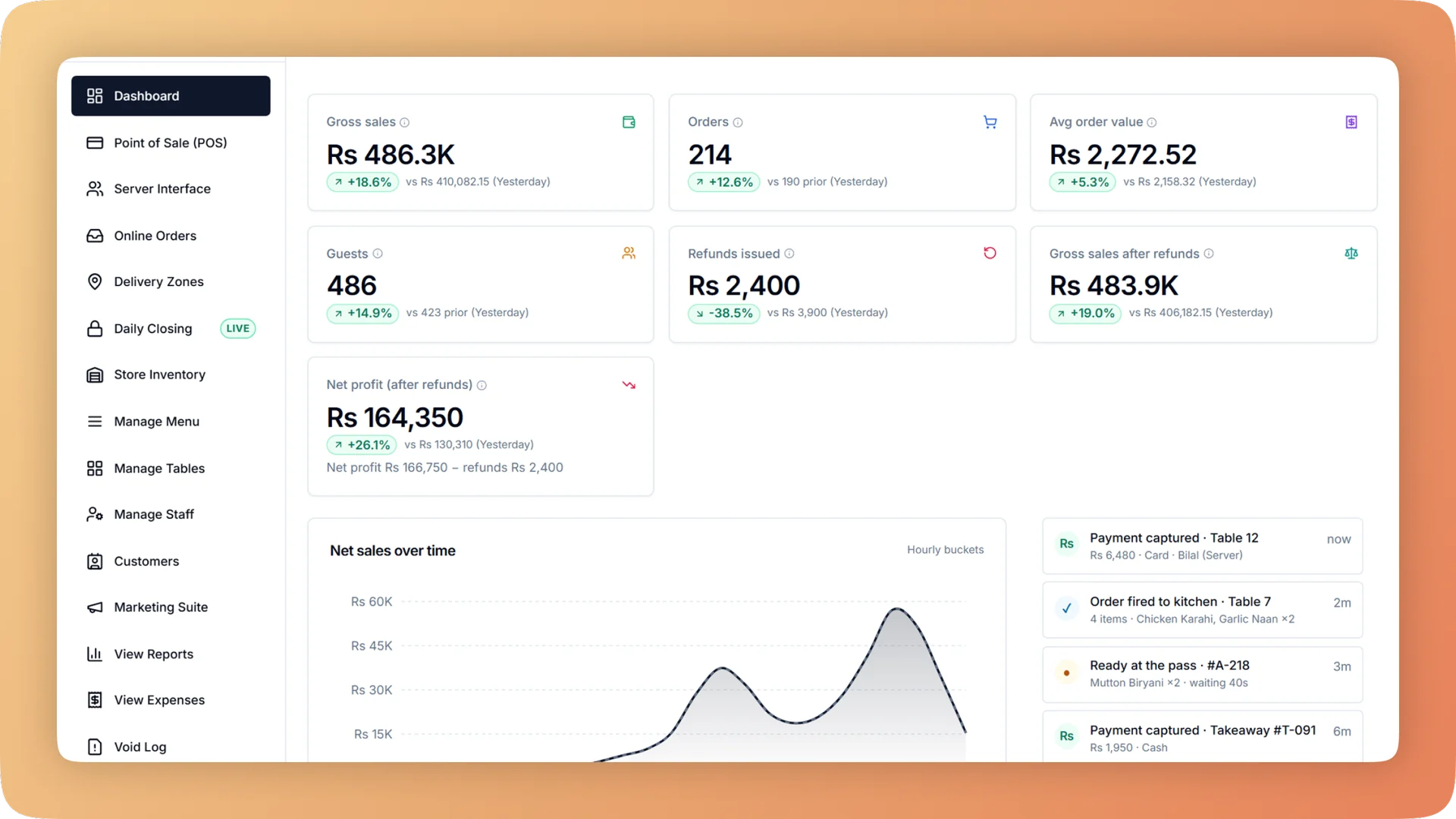
A multi-branch operation on Bhookly: each location runs its own menu, floor and staff, while owners see consolidated sales, stock and expenses across every branch in one dashboard and drill into any single location from their phone. About 30 minutes after each branch closes, the people you choose get a summary and the Z report as a PDF by email. A closing scorecard shows each branch's streak, missed days and days sealed without a count. Staff work in eight fixed roles, and voids, full comps, refunds and reopening a day need a manager's own PIN. Cooks tap Recipe on a ticket and read the ingredients and numbered steps, so the dish is made the same way everywhere. Void, day-close and tax logs cannot be edited or deleted.
Dashboard
Live sales, orders, net profit, kitchen pace and cash in the drawer across every branch, with automatic alerts for voids, slow tickets, low stock and open bills.
Reports & Analytics
Sales, margin, tax, refunds and profit and loss for any period and every branch. Click a total to see the bills behind it, then export it all for your accountant.
Store Inventory
Restaurant inventory management that deducts ingredients as each bill is paid, turns every count gap into a money figure and suggests what to reorder.
Staff Management
Restaurant staff management with eight job roles, a login for every person and manager PIN approval for voids, comps and refunds, so every action has a name.
Daily Closing
Open on a declared float, count cash, card and online step by step, and get a numbered Z report showing tonight's shortage and the shift it belongs to.
Recipe Costing
Recipe costing software for restaurants: see price, cost, profit and margin on every dish, with the food cost per plate worked out line by line.
Void Log
Every void needs a reason and a manager PIN, and lands in a permanent log: who voided, who approved, why, the value and whether the food was made.
Purchasing & Suppliers
Restaurant purchase orders and supplier management: approve orders, send them by WhatsApp, receive in one tap, track what you owe and catch price rises.
- Hardware for multi-branch restaurants
- POS terminals
- KDS screens
- Receipt printers
Plans for multi-branch restaurants from Rs 10,000/mo.
See pricing“Setup took less than a morning. By dinner service we were fully live. I've onboarded three POS systems over the years — this is by far the fastest I've ever seen a team get comfortable.”
Things people usually ask us.
Still have a question? Message us and we reply the same day.
Can I manage all branches from one login?
Yes. In Bhookly each branch has its own workspace, with a consolidated owner dashboard across all locations.
Can menus differ between branches?
Yes. In Bhookly each branch can run its own menu and pricing while you keep an overall view.
How do I know each branch closed properly last night?
Bhookly emails the Z report about 30 minutes after each close. The people you choose get a summary and the PDF, with sales, tax, counted versus expected cash, voids, refunds and discounts. A closing scorecard shows each branch's streak, missed days and days sealed without a count.
Can I stop branch staff from voiding and discounting without approval?
Yes. In Bhookly voids, full comps, refunds, reopening a day and stock write-offs need a manager's PIN, which records who approved. No two managers can share a PIN, and the void log flags voids approved by the same person who made them.
How do I keep dishes consistent across branches?
Put the recipe on the kitchen screen. In Bhookly a cook taps Recipe on any ticket and reads the ingredients and numbered steps at the quantity ordered, with no prices shown. New hires cook to the card without the head chef standing beside them.
What can each staff role see?
Bhookly has eight job roles: administrator, manager, cashier, waiter, kitchen, kitchen manager, inventory manager and accountant. Each sees only its own screens, enforced on the server as well as on the screen, so a waiter cannot open cash reports and a cashier cannot change prices.
Can a branch manager edit or delete records after the fact?
No. In Bhookly the void, day-close and tax logs cannot be edited or deleted, and a closed day is final. The most recent day can be reopened by PIN to fix a miscount, and every reopen is logged.
Can I track stock between the store and the kitchen in each branch?
Yes. In Bhookly stock lives in named places and moves only through a recorded request. The kitchen asks, the store approves and sends, the kitchen checks what arrived, and any shortage needs a reason, so a loss is traced to the storeroom, the transit or the line.
Bhookly for other restaurant types
See Bhookly set up for multi-branch restaurants.
چلیں، شروع کریں
Book a 20-minute demo. We'll show you Bhookly running on your kind of restaurant, with no pressure and no obligation.
- No lock-in contracts
- Live in a morning
- Same-day WhatsApp support