Restaurant table management that shows every table, live.
Draw the room as it is, then run service from it. Every table shows its guests, its bill and how long it has been waiting, and waiters order at the table without walking to the till.
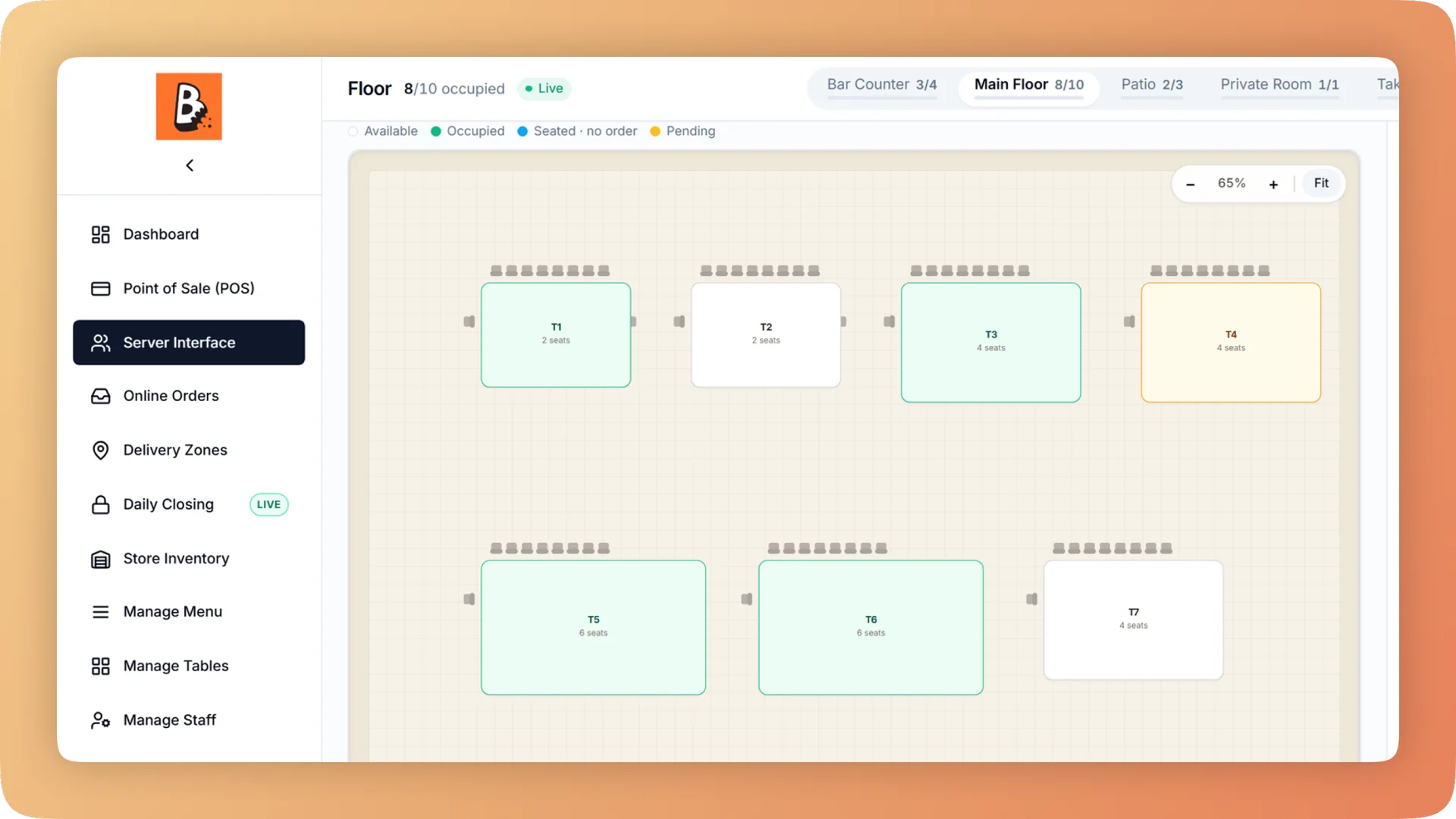
Table Management on a live shift.
Table management on your own floor plan: each table shows its order, guests, running bill and a timer, and waiters send orders to the kitchen from a tablet.
- Your own floor plan, across several floors, with each table's order, guests and running bill
- A timer on every table that turns green, amber, then red
- Waiters take the order on a tablet at the table and send it to the kitchen
- Move a table, print the bill, split it between 2 and 30 guests, settle or release
- Reserved, seated and free tables update on every device within about a second
What you get with Table Management.
- See slow tables and free tables at a glance
- The live floor map is your own room. Each table shows its order, its guests, its running bill and a timer that moves from green to amber to red, so a floor manager spots the table that has waited too long.
- Order where the guest is sitting
- A waiter taps a table, takes the order on a tablet and sends it to the kitchen. There is no walk to the till and no handwriting for the kitchen to misread.
- Waiters serve, the counter takes the money
- Waiters order and send to the kitchen. They cannot take payment, give a discount or cancel an order, so duties stay separate without anyone having to police it.
- A full floor that is actually full
- At one restaurant tables sat marked as seated for hundreds of hours, and staff turned walk-ins away from a floor that only looked full. Bhookly releases empty tabs by itself.
- No table leaves unbilled
- Every unpaid table stays on the open orders strip at the counter, and the owner's dashboard flags any bill left open far too long, with its value. One restaurant found a dine-in bill that had been open for seven weeks.
Everything Table Management does.
Used by waiters, floor managers, cashiers and owners.
The floor
The screen matches the room, and the room is always current.
- Floor plan builder
- Lay out several floors, choose table shapes and drag each table into position, with undo and redo.
- Live floor map
- Each table on the plan shows its order, guest count and running bill while service is on.
- Table timers
- A timer on every table turns green, amber, then red, so slow tables stand out from across the room.
- Reservations
- Mark a table as reserved so the whole team sees it is held, and seat the party from the same map when they arrive.
- Abandoned tables free themselves
- A table with an empty tab is released automatically, so the floor never looks fuller than it is.
- Live updates across devices
- A table seated on one tablet shows as seated on every till and tablet within about a second.
Ordering at the table
Waiters work from a tablet on the floor, and the counter keeps the money.
- Order at the table
- Tap the table, pick the dishes with their sizes and add-ons, and send the order to the kitchen from where you stand.
- Android app for waiters
- The floor screen runs as an Android app on a tablet and prints directly to network printers.
- Tablet orders on the counter's USB printer
- A ticket sent from a waiter's tablet is queued and printed by the counter's desktop app, so the floor needs no network printer of its own.
- Running tabs
- When the table orders another round, add it to the open order. The kitchen receives only the new items.
- Loyalty scan at the table
- Scan the guest's wallet card with the tablet camera, and the stamp is earned without a trip to the counter.
- Waiters cannot take money
- The waiter role orders and sends to the kitchen. Payment, discounts and cancellations stay with the cashier and the manager.
The bill at the table
Everything about a table is on the table itself.
- Table actions
- From any table: edit the order, view the bill, move the party to another table, print the bill, attach a loyalty guest, settle or release.
- Branded bill on the tablet
- Show the guest a full-screen bill in your restaurant's colours, with the total by cash and by card and a QR to join your loyalty card.
- Split bill by guest
- Split a table between 2 and 30 guests, evenly or by item. Each guest pays their own way and gets a slip.
- Open orders strip
- Every unpaid table is always visible at the counter, labelled by table or guest name, until it is settled.
What the owner learns from the floor
The floor produces numbers as well as orders.
- Tables and parties report
- See your busiest tables, sales per guest and the party sizes you really seat, for seating and floor-plan decisions.
- Forgotten open orders
- The dashboard flags bills that have been open far too long and shows what each is worth, which catches unbilled tables.
- Live floor on the dashboard
- Active orders, tables in use and average wait update on the owner's dashboard as service happens.
- Sales by waiter
- The staff performance report shows orders, guests, sales and average bill for each waiter who works the floor.
“We were managing everything on paper and WhatsApp. Bhookly changed that in a single day. Our kitchen team actually wants to use it — which has never happened with any software before.”
Things people usually ask us.
Still have a question? Message us and we reply the same day.
Can I build my own restaurant floor plan?
Yes. Bhookly's floor plan builder covers several floors, with table shapes you drag into position and undo and redo while you work. The live floor map then uses that plan during service.
Can waiters take orders at the table on a tablet?
Yes. In Bhookly a waiter taps a table, takes the order on a tablet and sends it to the kitchen. The Android app for waiters prints directly to network printers, and tablet tickets can also print on the counter's USB printer.
How do I know which tables have been waiting too long?
Bhookly puts a timer on every table that turns green, amber, then red. The live floor map also shows each table's order, guests and running bill, so slow tables and free tables are visible at a glance.
Does Bhookly handle reservations?
Yes. In Bhookly you mark a table as reserved on the floor map, and every till and tablet shows it as held until the party is seated.
Can I move guests to another table without losing their order?
Yes. Move table is one of Bhookly's table actions: the order, the guests and the running bill go with the party to the new table.
Can waiters take payment or give discounts?
No. In Bhookly waiters order and send to the kitchen, and they cannot take payment, discount or cancel. Those actions stay with cashiers and managers.
Can a table split the bill?
Yes. Bhookly splits a table's bill between 2 and 30 guests, evenly or by item, and each guest gets their own slip. See the Point of Sale page for how part payments and mixed payment work.
What stops a table from leaving without paying?
Bhookly keeps every unpaid table on the open orders strip at the counter and flags bills left open far too long on the owner's dashboard, with their value. One restaurant found a dine-in bill that had been open for seven weeks.
Works with the rest of Bhookly
Let's get your restaurant running on Bhookly.
چلیں، شروع کریں
Book a 20-minute demo. We'll show you Bhookly running on your kind of restaurant, with no pressure and no obligation.
- No lock-in contracts
- Live in a morning
- Same-day WhatsApp support