Restaurant CRM: a guest list you own.
Every till order, online order, loyalty sign-up and receipt claim adds a guest to one searchable directory. The list belongs to your restaurant, not to a delivery app.
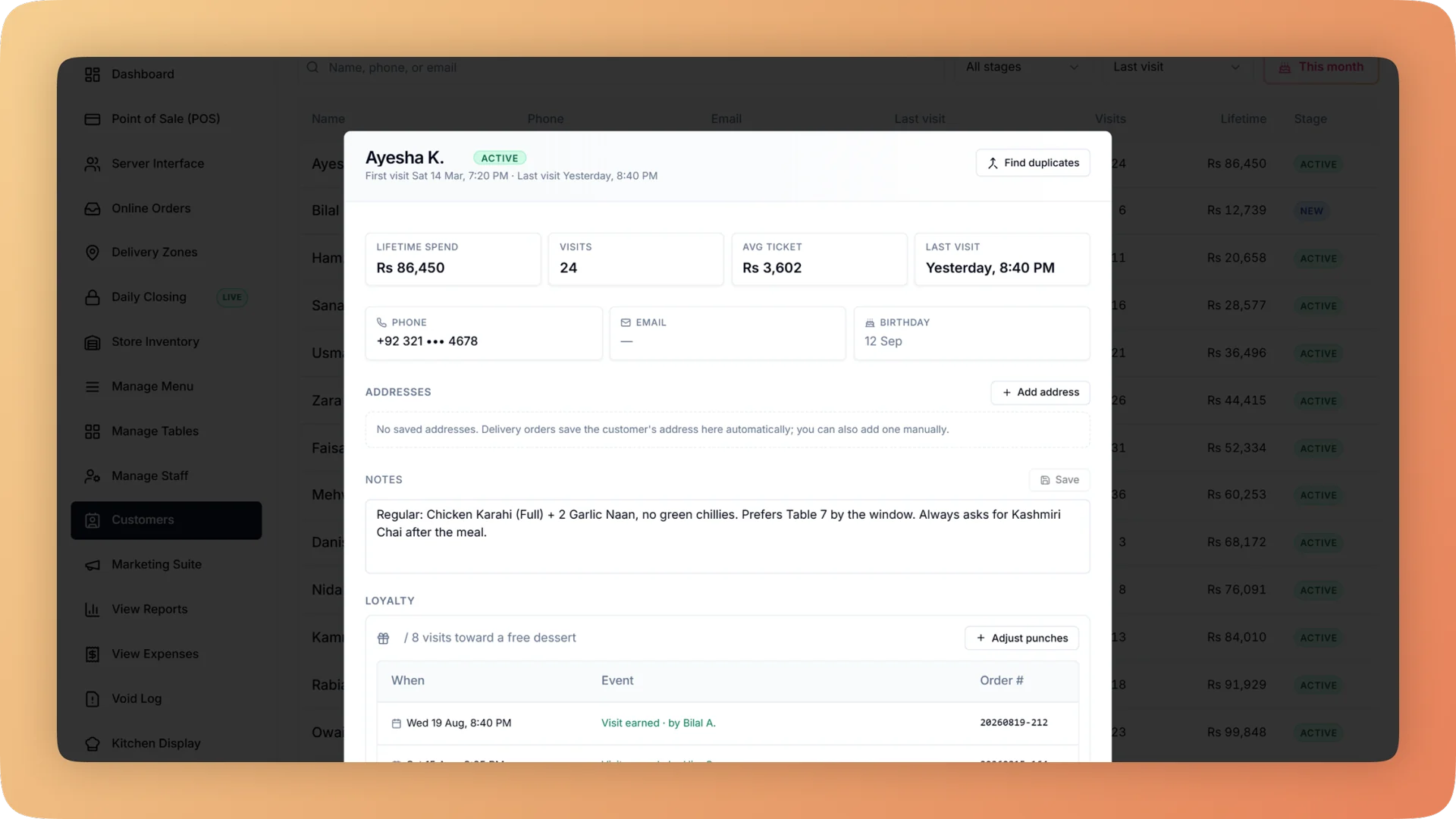
Restaurant CRM on a live shift.
Bhookly's restaurant CRM keeps every guest from the till, online orders and loyalty sign-ups in one directory you own, with visits, spend and lifecycle stage.
- One searchable directory of every guest, with visits, lifetime spend, average bill, last visit and stage
- Guests are added automatically from till orders, online orders, loyalty sign-ups and receipt claims
- Every guest is labelled New, Active, At risk, Lapsed or VIP each night
- Six ready-made segments with live counts, ready to export or message by WhatsApp, email or SMS
- Type a phone number at checkout and the till finds the guest and shows their loyalty status
What you get with Restaurant CRM.
- The guest list is yours, not a delivery app's
- A delivery app keeps the name and number of everyone who orders your food through it. Every guest who orders with Bhookly lands in a directory your restaurant owns, searches and exports.
- The list builds itself during service
- The cashier types a name or phone number on a till order, a customer checks out on your ordering website, a guest joins the loyalty card or claims a stamp from a receipt. Each one becomes a directory entry with nobody keying data after closing.
- See who is slipping away before they are gone
- Each night every guest is placed in one of five stages: New, Active, At risk, Lapsed or VIP. The At risk list is the one to act on, while a message can still bring the guest back.
- Segments without building filters
- Six lists are kept ready with live counts: birthdays this month, lapsed, at risk, VIPs, first-timers and regulars. Export any of them, or message one by WhatsApp, email or SMS.
- Staff recognise regulars
- A profile holds the guest's order history, loyalty ledger, saved addresses and staff notes such as an allergy or a favourite table. At the till, a phone number brings the guest up in seconds.
- Start with your existing guest book
- Import the list you already keep from a spreadsheet. A preview flags bad rows before anything is saved, and likely duplicates are suggested for merging with their history kept.
Everything Restaurant CRM does.
Used by owners, managers and cashiers.
The customer directory
One list of every guest the restaurant has served, on any channel.
- Customer directory
- One searchable list of every guest. Each row shows visits, lifetime spend, average bill, last visit and lifecycle stage.
- Automatic capture
- Guests are added from till orders, online orders, loyalty sign-ups and receipt claims. The list grows during normal service.
- Import from a spreadsheet
- Bring an existing guest list in from a spreadsheet. A preview flags bad rows before anything is saved.
- Manual add
- Add a single guest by hand, for example a regular who books by phone.
- Duplicate detection
- Bhookly suggests likely duplicates, such as one guest saved twice under two spellings.
- Merge with history kept
- Merging two records keeps the orders and stamps of both, so visit counts and lifetime spend stay correct.
The customer profile
Everything the restaurant knows about one guest, on one page.
- Order history
- Every order the guest has placed, at the counter, at a table or online.
- Loyalty ledger
- The guest's loyalty activity: stamps earned and rewards redeemed.
- Saved addresses
- Delivery addresses are stored on the profile and fill in at the till on the guest's next delivery order.
- Staff notes
- Notes such as an allergy or a favourite table, written once and seen by whoever serves the guest next.
- WhatsApp consent switch
- Each profile carries a switch that records whether the guest has agreed to receive WhatsApp messages.
Lifecycle stages and segments
The directory sorts itself, so the owner starts from a list and not from a filter builder.
- Five lifecycle stages
- Every guest is labelled New, Active, At risk, Lapsed or VIP. The labels are refreshed every night from real visits.
- Six ready-made segments
- Birthdays this month, lapsed, at risk, VIPs, first-timers and regulars. Each list shows a live count.
- Export a segment
- Download any segment as a file. The data is yours to take wherever you need it.
- Message a segment
- Send a segment a campaign by WhatsApp, email or SMS from the Marketing Suite, with a promo code to track who came back.
At the till and online
The places where a guest is recognised, and where a new one is captured.
- Customer lookup at the till
- The cashier types a name or phone number on an order. A known guest's saved delivery addresses fill in.
- Returning-guest lookup
- Typing a phone number at checkout finds the guest and shows their loyalty status, so regulars are recognised in seconds.
- Customer capture from online orders
- Every customer who orders on your ordering website joins the same directory as your walk-ins. This is the list a marketplace withholds.
- Customer accounts on the ordering website
- Customers can keep an account with saved addresses, favourites, past orders and their loyalty card, which makes repeat orders faster.
“Setup took less than a morning. By dinner service we were fully live. I've onboarded three POS systems over the years — this is by far the fastest I've ever seen a team get comfortable.”
Things people usually ask us.
Still have a question? Message us and we reply the same day.
What is a restaurant CRM?
A restaurant CRM, such as the one in Bhookly, is a record of every guest and what they ordered, used to bring them back. Bhookly's is a searchable directory showing each guest's visits, lifetime spend, average bill, last visit and lifecycle stage, built automatically from orders.
Do I own my customer data?
Yes, the customer data in Bhookly belongs to your restaurant. Every guest who orders at your till or on your own ordering website joins a directory you control, and any segment can be exported.
Where does the customer data come from?
Bhookly adds guests automatically from four places: till orders, online orders, loyalty sign-ups and receipt claims. Orders from the branded app and kiosks join the same profile, and an existing guest list can be imported from a spreadsheet.
Can I import my existing customer list?
Yes, Bhookly imports an existing guest list from a spreadsheet. A preview flags bad rows before anything is saved, and you can also add guests one at a time.
How do I find customers who have stopped coming?
Bhookly labels every guest New, Active, At risk, Lapsed or VIP each night, so the guests who are going quiet are already on a list. The At risk and Lapsed segments show live counts and can be exported or messaged.
What happens when the same customer is saved twice?
Bhookly suggests likely duplicate customers and merges them into one record. The merged record keeps the full history, so visit counts and lifetime spend stay correct.
Can I message customers from the CRM?
Yes, any Bhookly segment can be messaged by WhatsApp, email or SMS. Campaigns run from the Marketing Suite and can carry a promo code, so you see redemptions and revenue for each one.
Can staff see a guest's allergies or preferences?
Yes, each Bhookly customer profile has staff notes for details such as allergies or a favourite table. The profile also shows order history, the loyalty ledger, saved addresses and a WhatsApp consent switch.
Works with the rest of Bhookly
Let's get your restaurant running on Bhookly.
چلیں، شروع کریں
Book a 20-minute demo. We'll show you Bhookly running on your kind of restaurant, with no pressure and no obligation.
- No lock-in contracts
- Live in a morning
- Same-day WhatsApp support