A restaurant online ordering website that looks designed for your food.
Pick one of twelve designs, watch your real menu restyle beside the controls, and press Save. Customers order from your own link, and every order lands on the till with a chime, goes to the kitchen on Accept, and joins your customer list. No marketplace takes a cut.
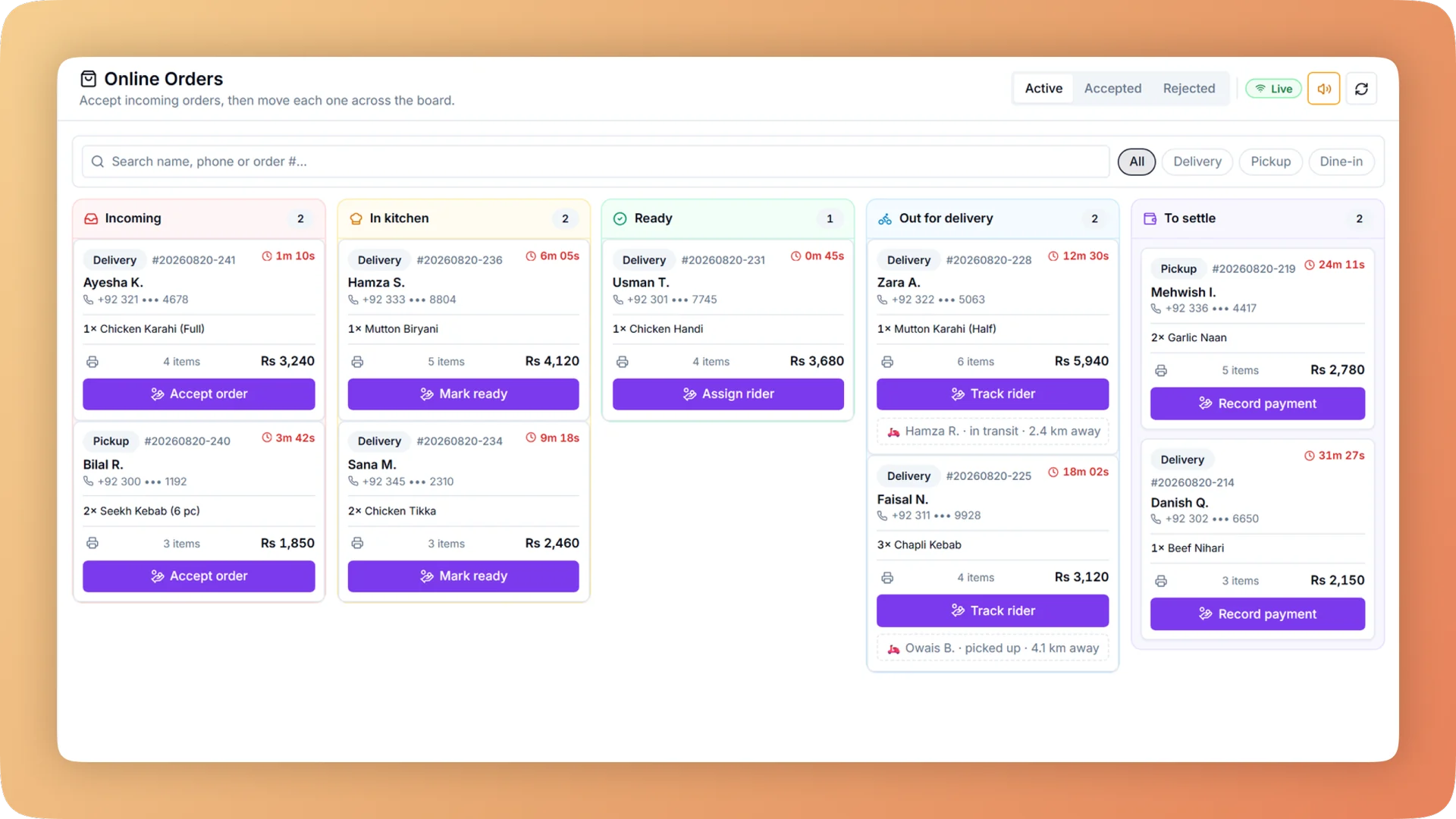
Online Ordering Website on a live shift.
Your own commission-free ordering website in one of twelve designs, with delivery zones, live order tracking and one inbox that sends every order to the kitchen.
- Twelve designs, each a full art direction for a type of restaurant, fine-tuned with 26 fonts, 12 hero styles and 8 menu layouts
- Delivery zones drawn on a map, each with its own charge, minimum order, delivery time and rider payout
- Web orders arrive on the till with a repeating chime: Accept sends the order to the kitchen, Reject sends the customer a reason
- A private tracking link that moves from Placed to Out for delivery as the kitchen actually works
- Every online customer joins the same directory as your walk-ins, so the list is yours and not a marketplace's
What you get with Online Ordering Website.
- A site that looks made for your food
- Counter, Bakery, Dhaba, Roastery, Night, Fresh, Heritage, Atelier, Pop, Shelf, Docket and Bistro. Each of the twelve designs is a complete art direction for a kind of restaurant, not the same page in a different colour. A bakery, a burger counter and a fine-dining room each get a site that looks like it was drawn for them.
- Live in a day, with no developer
- The Website page puts your real site beside the controls. Change a colour, a font or a hero style and the preview restyles at once, on phone and desktop, in light and dark. Nothing reaches customers until you press Save. Bhookly's team sets the restaurant up and loads the menu, so the site can be taking orders the day you choose a design.
- Customers see the fee before they build a basket
- On arrival the customer chooses delivery or takeaway and their area, by list or by GPS, and sees the delivery fee and time straight away. On delivery orders they drop a pin on a map, so the rider navigates to a point and not to a vague address. Visitors outside your zones are told at the start, not at checkout.
- One inbox on the till, not another tablet
- Website orders arrive in the same inbox as table QR and WhatsApp orders, with a chime that repeats until someone answers. Accept fires the order to the right kitchen stations. Reject sends the customer the reason. Nobody re-keys an order from one screen into another.
- Tracking driven by the kitchen, not a guess
- Each order has a private link showing Placed, Confirmed, Preparing, Ready or Out for delivery. The stages move when your staff accept the order and when the cook marks it done on the kitchen display. The customer also gets received, confirmed and ready emails carrying the same link.
- You keep the customer, not the marketplace
- There is no commission on an order placed through your own site, and the person who placed it is added to your customer directory with their visits and spend. That is the list delivery marketplaces withhold, and the one your win-back campaigns and loyalty card run on.
Everything Online Ordering Website does.
Used by owners, managers, cashiers and customers.
The menu and the basket
What a customer sees when they open your link: your name, your food and a basket that is hard to get wrong.
- Branded ordering website
- A mobile-first site with your restaurant's name, logo and colours, the full menu with photos and badges, and search across every dish.
- Item options
- Sizes and paid add-ons on one sheet with a live total and a note field. If a required choice is missing, the site names it and jumps to it.
- Basket with upsell
- A "Popular with your order" rail suggests additions, and a nudge shows how far the basket is from the minimum order.
- Featured dishes
- You pick the dishes that sit at the top of the menu, so signature and high-margin items are seen first.
- Deals strip and promo codes
- Public promo codes appear as tappable deals and apply themselves at checkout. You run the offer and no marketplace takes a share of it.
- Installable app
- Customers add the site to their home screen and it opens like an app, under your restaurant's own icon. No app store is involved.
- Search and link previews
- When your link is shared on WhatsApp or appears in Google, the preview shows your restaurant's name and photo.
- Opening hours and minimum order
- Set weekly online hours and minimum order values. The site enforces both, so no order arrives when the kitchen is closed.
Delivery, checkout and tracking
From "where are you ordering from?" to the moment the food is ready, the customer always knows the fee, the time and the status.
- "Where are you ordering from?"
- The first step asks for delivery or takeaway and the customer's area, by list or GPS, then shows the fee and time before a single item is added.
- Pin-drop delivery location
- The customer drops a pin on a map and the fee and delivery time update live. The rider gets a point to navigate to.
- Guest checkout with email code
- Customers order without creating an account. A one-time code sent by email confirms the order is real and blocks prank orders.
- Customer accounts
- Customers who sign in get saved addresses, favourites, their past orders and their loyalty card in one place.
- Payment
- Customers pay online, or in cash on delivery or at pickup. Either way the order is recorded against the right payment type for the day close.
- Live order tracking
- A private link shows Placed, Confirmed, Preparing, Ready or Out for delivery. Each stage is set by what the till and the kitchen actually do.
- Order emails
- Received, confirmed and ready emails go out automatically, each with the tracking link.
- "Food is ready" messages
- When the cook marks the ticket done, the counter sees a notice, the customer is emailed, and the online tracker moves to Ready.
Twelve designs and a live-preview studio
The design work is done before you start. You choose, adjust and save, and the site cannot be made unreadable.
- Twelve designs
- Counter, Bakery, Dhaba, Roastery, Night, Fresh, Heritage, Atelier, Pop, Shelf, Docket and Bistro. Each is a full art direction for a type of restaurant.
- Fine-tuning
- Change colours, shapes, backgrounds, photos, wording and sections. Choose from 26 fonts, 12 hero styles and 8 menu layouts.
- Automatic text contrast
- Text colour is worked out from whatever background you choose, so every heading and price stays readable.
- Website page with live preview
- Your real site sits beside the controls and restyles on every change, on phone and desktop, in light and dark. Nothing goes live until Save.
- Shareable design previews
- A link shows your own menu in a different design without saving anything, so partners can compare designs before you commit.
Delivery zones, the order inbox and dispatch
The staff side. Online orders behave like counter sales: same kitchen, same reports, same day close.
- Delivery zones
- Draw zones on a map and give each its own delivery charge, minimum order, delivery time and rider payout. Far areas cost more and out-of-area orders are stopped.
- Online orders inbox
- Web, QR and WhatsApp orders arrive on the till with a repeating chime. Staff accept each order, which sends it to the kitchen.
- Reject with a reason
- If the kitchen cannot take an order, Reject sends the customer the reason, so nobody is left waiting for food that is not coming.
- Dispatch board
- Lanes for New, In kitchen, Ready, Out for delivery and To settle, with the customer's map pin on each order. You see which orders are out and which riders still owe cash.
- Customer capture
- Every online customer joins the same customer directory as walk-ins, with visits, spend and last order.
- Kitchen, reports and day close
- An accepted online order routes to kitchen stations, appears in sales reports under its own order type, and is counted in the nightly close like any counter sale.
“We were managing everything on paper and WhatsApp. Bhookly changed that in a single day. Our kitchen team actually wants to use it — which has never happened with any software before.”
Things people usually ask us.
Still have a question? Message us and we reply the same day.
Does Bhookly charge commission on online orders?
No. Bhookly charges no commission on orders placed through your own ordering website. Delivery marketplaces typically take 25 to 35% of each order; an order on your Bhookly site goes to your till in full, and the customer goes into your own customer directory.
How long does it take to launch a restaurant ordering website?
A Bhookly ordering website can be live in a day. Bhookly's team sets up the restaurant and loads the menu, you choose one of twelve designs, adjust it in the live preview and press Save. There is no developer to brief and no build to wait for.
What do the website designs look like?
Bhookly has twelve designs: Counter, Bakery, Dhaba, Roastery, Night, Fresh, Heritage, Atelier, Pop, Shelf, Docket and Bistro. Each is a full art direction for a type of restaurant, and each can be fine-tuned with 26 fonts, 12 hero styles, 8 menu layouts and your own colours and photos. Text contrast is worked out automatically, so the site stays readable.
Where do online orders show up?
Online orders arrive in the orders inbox on the Bhookly till with a repeating chime. Accept sends the order to the kitchen display or kitchen printer; Reject sends the customer a reason. Website, table QR and WhatsApp orders share the same inbox, so there is no extra tablet per channel.
Can I set different delivery charges for different areas?
Yes. In Bhookly you draw delivery zones on a map and give each zone its own charge, minimum order, delivery time and rider payout. Customers see the fee and time for their area before they build a basket, and addresses outside every zone are told early.
Can customers track their order?
Yes. Every Bhookly online order has a private tracking link showing Placed, Confirmed, Preparing, Ready or Out for delivery. The stages follow what staff and cooks actually do, and the customer also gets emails when the order is received, confirmed and ready.
Do customers have to create an account or download an app?
No. Customers can check out as a guest on a Bhookly ordering website, confirming the order with a one-time code sent by email. Those who want to can create an account for saved addresses, favourites and past orders, or add the site to their home screen as an app with your restaurant's icon.
How do customers pay for online orders?
Customers on a Bhookly ordering website can pay online or pay in cash on delivery or at pickup. Each order is recorded under its payment type, so the nightly close counts cash, card and online separately.
Works with the rest of Bhookly
Let's get your restaurant running on Bhookly.
چلیں، شروع کریں
Book a 20-minute demo. We'll show you Bhookly running on your kind of restaurant, with no pressure and no obligation.
- No lock-in contracts
- Live in a morning
- Same-day WhatsApp support