The restaurant void, discount and refund log with a name on every entry.
Voids, full comps and refunds all need a manager's PIN and a reason. Each one is written to a record nobody can edit, and Bhookly alerts you when voids run above your restaurant's own normal.
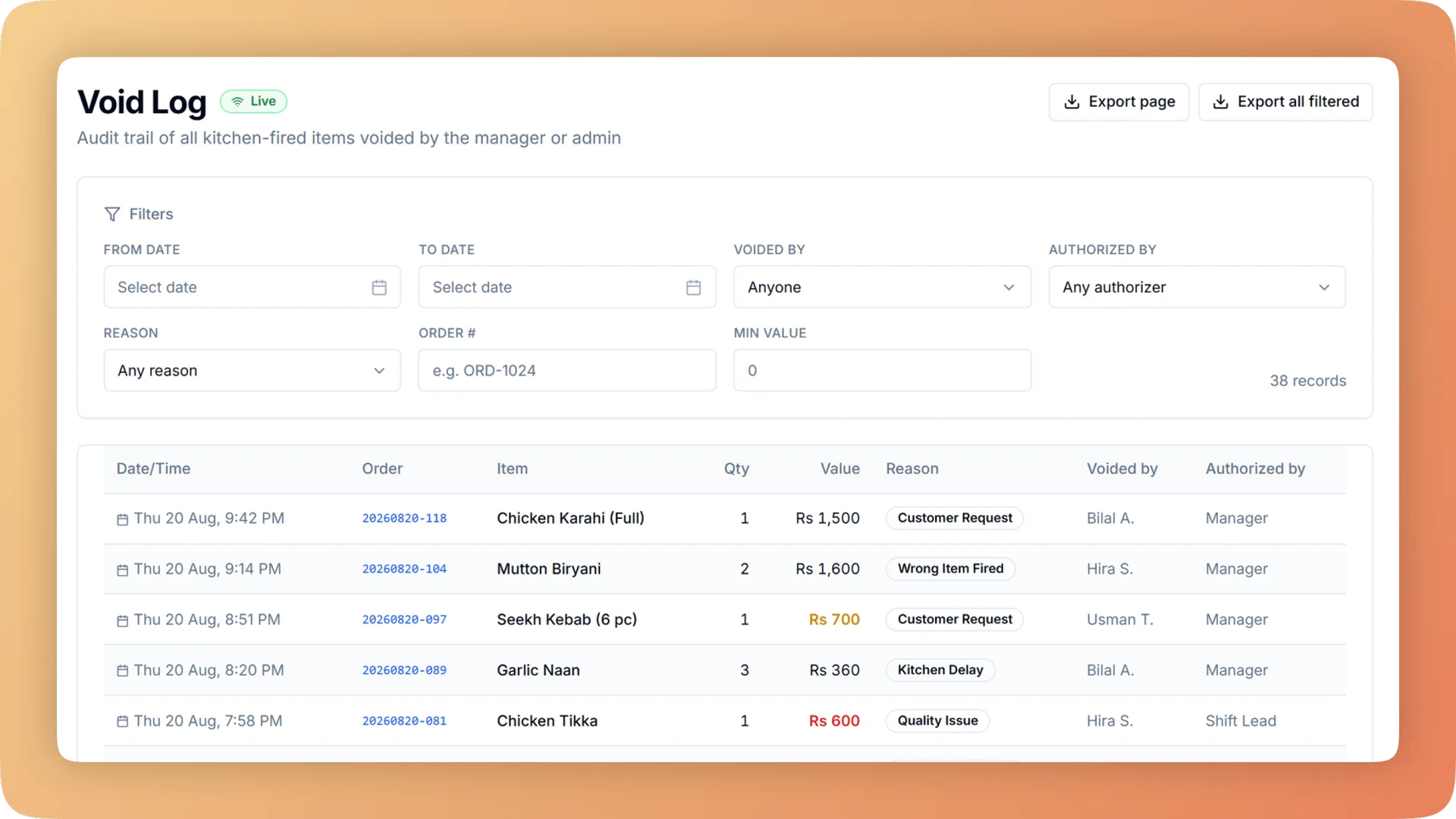
Void Log on a live shift.
Every void needs a reason and a manager PIN, and lands in a permanent log: who voided, who approved, why, the value and whether the food was made.
- Voiding a sent item needs a reason and a manager PIN
- The log shows who voided, who approved, why, the value and whether the food was made
- Voids approved by the same person who made them are flagged
- A full comp needs a PIN too, so a discount to zero cannot stand in for a void
- Refunds are credit notes: the original sale is never deleted
What you get with Void Log.
- No void without a supervisor
- Once an item has gone to the kitchen, removing it takes a reason and a manager's PIN. The PIN records who approved, and no two managers can share one.
- A log that shows the pattern
- The void log is a permanent list of every voided item: who voided it, who approved it, why, what it was worth and whether the food was made. Voids approved by the same person who made them carry a flag.
- Voids stop hiding food cost
- Every void asks one question: "Not made" or "Made, thrown away". A dish that was made has its ingredients written off as waste at ingredient cost, so the loss shows in your stock figures.
- The discount-to-zero trick is closed
- Partial discounts by amount or percentage are quick. Discounting an item all the way to zero needs a manager PIN, exactly like a void, so a comp cannot be used to dodge the log.
- The kitchen is told straight away
- A voided item prints a "DO NOT MAKE" slip at the station holding the ticket, and stays on the kitchen board struck through with a VOIDED badge. The kitchen stops cooking food nobody will pay for.
- You hear about it without looking
- Bhookly learns your restaurant's usual level of voids and raises an alert on the owner dashboard when a day runs above it.
Everything Void Log does.
Used by owners, managers, cashiers and accountants.
Voiding an item
What happens at the till and in the kitchen in the seconds after a void.
- Voids with reason and PIN
- Voiding an item that has been sent to the kitchen needs a reason and a manager PIN. Voids are deliberate, approved and recorded.
- "Was it made?" on voids
- The void asks "Not made" or "Made, thrown away". The answer is stored with the void and decides whether stock is touched.
- Made dishes written off as waste
- When a voided dish was already made, its ingredients leave stock as waste, valued at ingredient cost.
- "DO NOT MAKE" void slip
- In a paper kitchen the voided item prints "DO NOT MAKE" at the station that holds the ticket.
- Voids on the kitchen board
- On a kitchen display the voided item stays visible, struck through, with a VOIDED badge. The cook sees the change without anyone walking in.
- One PIN per manager
- No two managers can share a PIN, so the approver on every void is one identifiable person.
The void log
The owner's view: every void on one permanent list.
- Who voided and who approved
- Each entry names the staff member who voided the item and the manager whose PIN approved it.
- Reason and value
- The reason given and the value of the item are stored on every entry, so a week of voids adds up to a money figure.
- Whether the food was made
- The log separates voids that cost nothing from voids where a finished dish went in the bin.
- Self-approved voids flagged
- A void approved by the same person who made it is flagged in the log. Those are the entries to read first.
- Tamper-proof records
- Void, day-close and tax logs cannot be edited or deleted, even in the database. Evidence cannot be erased.
- Alert when voids run high
- The owner dashboard raises an automatic alert when voids go above the restaurant's own normal, and shows the day's void count live.
Discounts and comps
Discounts are the other way a bill gets smaller, so they follow rules too.
- Bill and item discounts
- Discount a whole bill or a single item, by amount or by percentage.
- Full comp needs a PIN
- Taking an item to zero needs a manager PIN. This closes the trick of discounting to zero instead of voiding.
- One discount per bill
- A manual discount, a promo code, a bank card deal and a loyalty reward cannot be stacked on the same bill. Discounts cannot be piled up and reports stay clean.
- Waiters cannot discount or cancel
- Waiters take orders and send them to the kitchen. They cannot take payment, give a discount or cancel an order.
- Voids and discounts on the Z report
- The numbered end-of-day slip lists the day's voids, refunds and discounts next to sales and the cash count.
Refunds and reprints
Money going back to a guest and paper being printed twice both leave a record.
- Refunds as credit notes
- A sale is never deleted. A refund is a credit note against the original bill, and the till still balances at close.
- Full or partial refunds, by PIN
- Refund a whole bill or part of one. Either way it needs a manager PIN and a reason, and you choose whether the refunded items go back into stock.
- Refund log
- Refunds are listed per day with printable refund receipts, so the owner and the accountant can audit each one.
- Reprinted kitchen tickets marked REPRINT
- The counter can reprint a lost kitchen ticket in one tap. The slip is marked REPRINT and the reprint is logged, so a second slip cannot pass as a new order.
“The table layout builder alone saved us from so much confusion during peak hours. And the analytics finally gave us a real picture of what's actually selling versus what we think is selling.”
Things people usually ask us.
Still have a question? Message us and we reply the same day.
Can I stop staff from voiding items without permission?
Yes. In Bhookly, voiding an item that has been sent to the kitchen needs a reason and a manager PIN, and the void is written to a permanent log with the names of the person who voided it and the manager who approved it.
What does the void log show?
Bhookly's void log lists every voided item with who voided it, who approved it, the reason, the value and whether the food had been made. It also flags voids approved by the same person who made them.
Can I stop cashiers from giving 100% discounts?
Yes. Bhookly requires a manager PIN to comp an item in full, so a cashier cannot discount an item to zero in place of voiding it. Only one discount can apply to a bill, so discounts cannot be stacked either.
Can a void or refund be deleted from the records?
No. Bhookly's void, day-close and tax logs cannot be edited or deleted, even in the database, and a refunded sale stays on record with a credit note against it.
Who can refund a bill?
A refund in Bhookly needs a manager's PIN and a reason, whether it is full or partial. It is recorded as a credit note and listed in the refund log with a printable refund receipt.
What happens to the food when an order is voided after it was cooked?
Bhookly asks whether the voided item was made. If the answer is "Made, thrown away", its ingredients are written off as waste at ingredient cost, so the loss appears in your stock and waste figures.
Does the kitchen know when an item is voided?
Yes. Bhookly prints a "DO NOT MAKE" slip at the station holding the ticket, and on a kitchen display the item stays on the board struck through with a VOIDED badge.
Will I be told if voids suddenly increase?
Yes. Bhookly raises an automatic alert on the owner dashboard when voids run above your restaurant's own normal level, and the Z report lists each day's voids, refunds and discounts.
Works with the rest of Bhookly
Let's get your restaurant running on Bhookly.
چلیں، شروع کریں
Book a 20-minute demo. We'll show you Bhookly running on your kind of restaurant, with no pressure and no obligation.
- No lock-in contracts
- Live in a morning
- Same-day WhatsApp support