The restaurant owner dashboard that raises the alarm for you.
See takings and profit without phoning the manager. Bhookly shows today's numbers as they happen, on your phone or laptop, and flags what needs you: a drawer left open, voids above normal, an unhappy guest still at the table.
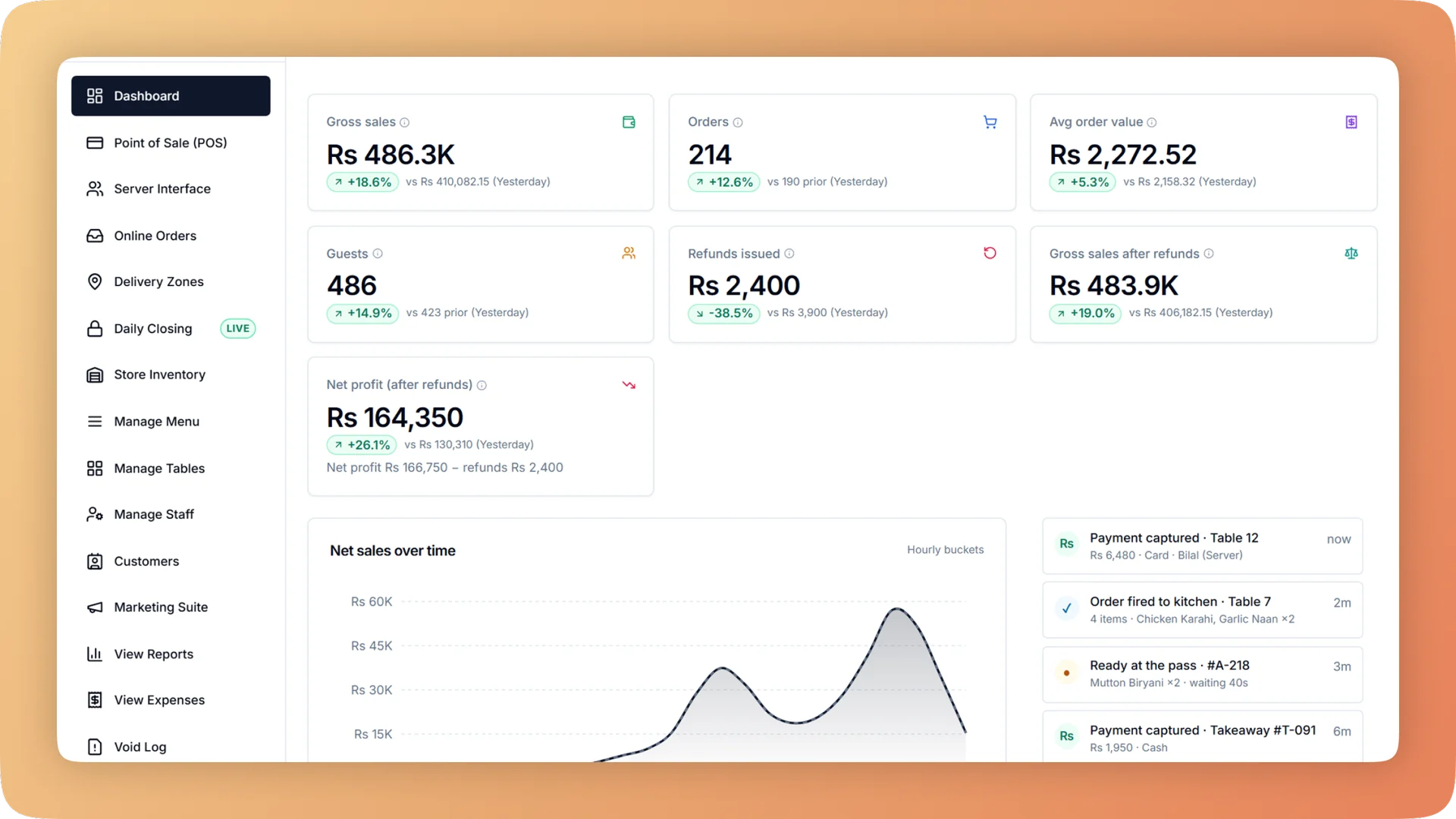
Dashboard on a live shift.
Live sales, orders, net profit, kitchen pace and cash in the drawer across every branch, with automatic alerts for voids, slow tickets, low stock and open bills.
- Today's sales, orders, average bill, guests, refunds, net profit and tax, each compared with the previous period
- A live pulse of active orders, kitchen queue, tables, average wait, voids and cash in the drawer
- Automatic alerts for stock, slow tickets, voids, thrown-away food, unclosed drawers and unhappy guests
- Bills left open far too long, flagged with their value
- Every branch rolled up into one view, with each one a click away
What you get with Dashboard.
- Today's numbers, as they happen
- Sales, orders, average bill, guests, refunds, net profit and tax sit on one screen, each beside the previous period. Top items and the split between cash, card and online are underneath.
- Watch the floor from anywhere
- The live pulse shows active orders, how many are in the kitchen and how many are ready, tables in use, average wait, voids today and cash in the drawer. An activity feed lists what staff are doing as it happens.
- Trouble surfaces by itself
- Bhookly compares today against your restaurant's own normal and raises an alert when voids or thrown-away food run above it. It also flags low and expiring stock, slow tickets, a drawer not closed, days sealed without a count and unhappy guests waiting.
- A profit figure that says how far to trust it
- The profit panel runs from sales down to net profit. A badge beside it shows how much of your menu has a cost set, so you know whether the number is complete or an estimate.
- The bill nobody closed
- Open orders that have sat far too long are flagged with their value. One restaurant found a dine-in bill that had been open for seven weeks.
- All branches, one view
- Roll every branch up into a single live picture, or open one location to see its own sales, kitchen and drawer.
Everything Dashboard does.
Used by owners, managers and head chefs.
Today at a glance
The numbers an owner asks the manager for, already on screen.
- Sales, orders and average bill
- Today's takings, the number of orders and the average bill, updated as each bill is paid.
- Guests and refunds
- How many guests were served and how much was refunded, so a good sales figure is not hiding a bad day.
- Net profit and tax
- Profit after cost and expenses, and the tax collected, without waiting for month end.
- Comparison with the previous period
- Every headline number shows the change against the period before it. You see at once whether today is ahead or behind.
- Top items
- The dishes selling most today, ranked.
- Payment mix
- The share of sales taken by cash, card and online, which tells you how much cash should be in the building.
- Profit panel with a trust badge
- Sales down to net profit in one panel. The badge states what share of the menu has a cost set, so the reliability of the profit figure is on the screen with it.
- Every branch in one view
- A consolidated view adds all locations together. Drill into any branch to see it alone.
Live pulse
What is happening on the floor and in the kitchen this minute.
- Active orders, in kitchen and ready
- Counts of orders in progress, tickets being cooked and food waiting to be picked up.
- Tables and average wait
- How many tables are in use and how long guests are waiting on average right now.
- Voids today
- A running count of voided items. A number climbing faster than usual is visible before the shift ends.
- Cash in the drawer
- The cash that should be in the drawer at this moment, so you know what the count ought to find tonight.
- Activity feed
- A running list of what is happening in the restaurant, updated as it happens. You read the shift the way you would if you were standing at the counter.
- Kitchen performance strip
- The last 24 hours of the kitchen in three numbers: average prep time, percentage of tickets on time and tickets completed.
- Kitchen flow dashboard
- Live boxes for cooking plans, batches being cooked, store requests, the store and buying. Each shows what is waiting, short or late, so the whole back of house is on one screen.
Automatic alerts
You do not have to go looking. Each of these appears when it becomes true.
- Low and expiring stock
- Items running low and batches close to their use-by date, before a dish has to come off the menu or stock has to be thrown out.
- Slow tickets
- Kitchen tickets running past their target prep time.
- Voids above your normal
- Bhookly learns your restaurant's usual level of voids and alerts you when a day runs above it.
- Food thrown away above normal
- The same test for waste: an alert when more food is binned than your kitchen usually bins.
- Drawer not closed
- A drawer or a day that should have been closed and has not been.
- Days sealed without a count
- Days that were force-closed with no cash count, which is where shortages hide.
- Unhappy guests waiting
- Low ratings that nobody has answered yet, so a complaint is handled while it can still be fixed.
- Forgotten open orders
- Bills left open far longer than a meal lasts, listed with their value. It catches tables that were served and never billed.
Updates that come to you
On the days you do not open the dashboard, the important numbers still arrive.
- Emailed Z report
- About 30 minutes after each close, you and the people you choose get the day's summary and the Z report as a PDF, including the till difference.
- WhatsApp alerts for the owner
- Messages for short deliveries, ingredients used beyond what recipes allow, supplier price jumps, expiring stock and late suppliers.
- Morning digest on WhatsApp
- One WhatsApp message each morning that gathers the alerts into a single read before service starts.
- Weekly owner digest
- A weekly summary by WhatsApp or email: new loyalty members, visits and regulars who have gone quiet.
- Marketing overview
- One page of marketing numbers, your customer mix and a needs-attention list. A weekly check takes a minute.
“The table layout builder alone saved us from so much confusion during peak hours. And the analytics finally gave us a real picture of what's actually selling versus what we think is selling.”
Things people usually ask us.
Still have a question? Message us and we reply the same day.
Can I check my restaurant's sales from my phone?
Yes. The Bhookly dashboard runs in the browser on a phone, tablet or laptop, and shows today's sales, orders, average bill, guests, refunds, net profit and tax as they happen. You do not need to be in the restaurant or call the manager.
What does the restaurant owner dashboard show?
The Bhookly owner dashboard shows today's sales, orders, average bill, guests, refunds, net profit and tax, each compared with the previous period, plus top items and payment mix. A live pulse adds active orders, kitchen queue, tables, average wait, voids today and cash in the drawer.
Which alerts does the dashboard raise automatically?
Bhookly raises alerts for low and expiring stock, slow kitchen tickets, voids above your restaurant's own normal, food thrown away above normal, a drawer not closed, days sealed without a cash count and unhappy guests waiting for a reply. It also flags bills that have been left open far too long.
Does the dashboard cover more than one branch?
Yes. Bhookly rolls every branch into one consolidated view and lets you drill into any single location.
Can I trust the profit figure on the dashboard?
Bhookly tells you how far to trust it. The profit panel runs from sales down to net profit and carries a badge showing how much of your menu has a cost set, so a figure built on a half-costed menu is labelled as such.
How will I know if a table was served but never billed?
Bhookly flags it on the dashboard. Any order left open far longer than normal is listed with its value, which is how one restaurant found a dine-in bill that had been open for seven weeks.
Do I have to open the dashboard every day to stay informed?
No. Bhookly emails the Z report about 30 minutes after each close, sends WhatsApp alerts and a morning digest for stock and supplier problems, and sends a weekly owner digest of new members, visits and regulars going quiet.
Works with the rest of Bhookly
Let's get your restaurant running on Bhookly.
چلیں، شروع کریں
Book a 20-minute demo. We'll show you Bhookly running on your kind of restaurant, with no pressure and no obligation.
- No lock-in contracts
- Live in a morning
- Same-day WhatsApp support