Point of Sale for cafés.
Point of Sale for cafés shares one Bhookly system with the kitchen, the stock room and the day close. A sale rung once updates stock, the customer directory and the reports, with nothing keyed twice.
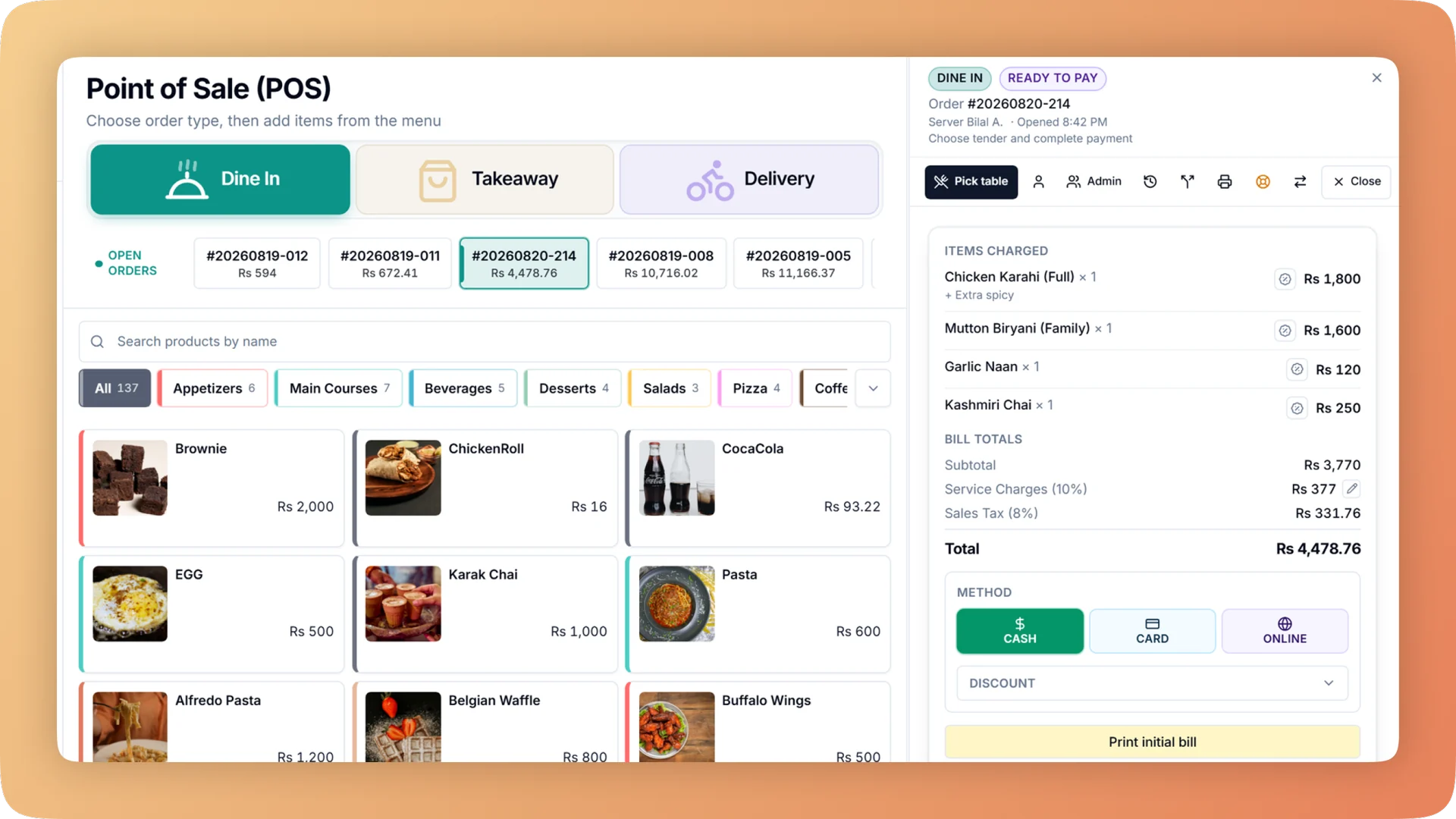
What Point of Sale does for your café.
- One screen, no detours
- The menu sits on the left and the live ticket and payment on the right, so a cashier never changes screen between ordering and paying. Search the whole menu by name, code or barcode, and run a full sale from the keyboard.
- Group bills without a calculator
- Split a bill between 2 and 30 guests, evenly or by item. Each guest pays their own way and gets their own slip, and a different till can pick the split up halfway through.
- The queue keeps moving
- Park an undecided guest's order and serve the next person. Nothing goes to the kitchen and no order number is used until the order is resumed, on that till or any other.
- Discounts that cannot be piled up
- A manual discount, a promo code, a bank card deal and a loyalty reward cannot be stacked on one bill. A full comp of an item needs a manager PIN, which closes the trick of discounting to zero instead of voiding.
- Built around mistakes that really happen
- One restaurant had 17 duplicate orders in 60 days. In Bhookly a double tap or a retry can only ever create one order, an unfinished order survives a crash, and the server refuses a stale total at payment.
- Every receipt brings the guest back
- Design the receipt with your logo and colours, then let it carry a loyalty QR, a comeback coupon, a review QR or an apology coupon. Send it on paper, by email or on WhatsApp.
Built for how cafés actually run.
- Full Point of Sale overview
A restaurant POS with one screen from order to payment: split a bill between 2 and 30 guests, hold orders, apply bank card deals and keep selling offline.
- Bhookly for cafés
Café POS with a loyalty card in the phone wallet.
- Paper stamp cards get lost or forged, and you never learn who your regulars are.
- One undecided guest at the counter holds up the whole morning queue.
- A latte comes in three sizes with six add-ons, and nobody knows what each version costs to make.
- Slow afternoons get filled with discounts that eat the margin.
- Home bakers stock your display, and working out what each one is owed takes a notebook and an evening.
- Delivery-app commission comes out of a margin that was already thin.
More of what cafés run on
Loyalty & Wallet Cards for cafés
A restaurant loyalty programme with a digital stamp card in Apple Wallet and Google Wallet. Guests join by QR in seconds, with no app and no paper card.
Recipe Costing for cafés
Recipe costing software for restaurants: see price, cost, profit and margin on every dish, with the food cost per plate worked out line by line.
Menu Management for cafés
One menu runs the till, kitchen, QR menu, ordering website and WhatsApp. Set sizes, add-ons and deals once, and mark a dish sold out everywhere in one tap.
Things people usually ask us.
Still have a question? Message us and we reply the same day.
Does the POS work without internet?
Yes. In the Bhookly Windows and Android apps, order taking, kitchen tickets and payment all continue through an internet cut. Orders carry a temporary code and sync when the connection returns, which matters during load-shedding.
Which payment methods does the POS support?
Bhookly takes cash, card and online payments, including Easypaisa and JazzCash, plus gift cards. Each payment type carries its own tax rate where the law requires one, and one bill can be settled across several methods.
Can I split a bill between guests?
Yes. Bhookly splits a bill between 2 and 30 guests, evenly or by item. Each guest pays by their own method and gets their own slip, and a different till can pick up the split partway through.
Can I stop cashiers from stacking discounts?
Yes. Bhookly allows one discount per bill, so a manual discount, a promo code, a bank card deal and a loyalty reward cannot be combined. A full comp of an item also needs a manager PIN.
What hardware do I need to run the POS?
Bhookly runs on the Windows PC you already own, and in any browser on a phone, tablet or desktop. The Windows app adds silent printing and a printer per station, and the Android app puts the floor on a waiter's tablet.
Can I hold an order while a guest decides?
Yes. Bhookly lets a cashier park an order and serve the next guest. Nothing is sent to the kitchen and no order number is used until the order is resumed, which any till can do.
Can I put my logo and offers on the receipt?
Yes. Bhookly's receipt designer sets your logo, address, header and footer lines, colours, paper width and font size with a live preview. The receipt can also carry a loyalty QR, a comeback coupon, a review QR or an apology coupon.
What happens if the till crashes in the middle of an order?
The order comes back. Bhookly restores an unfinished order after a refresh, a crash or an update, and a retry or a double tap can only ever create one order.
Run point of sale on Bhookly.
چلیں، شروع کریں
Book a 20-minute demo. We'll show you Bhookly running on your kind of restaurant, with no pressure and no obligation.
- No lock-in contracts
- Live in a morning
- Same-day WhatsApp support