Restaurant expense tracking and profit and loss, without waiting for the accountant.
Record rent, salaries, utilities and every drawer cash-out where they happen. Bhookly sets them against sales and cost of goods, and shows gross sales down to net profit for any period.
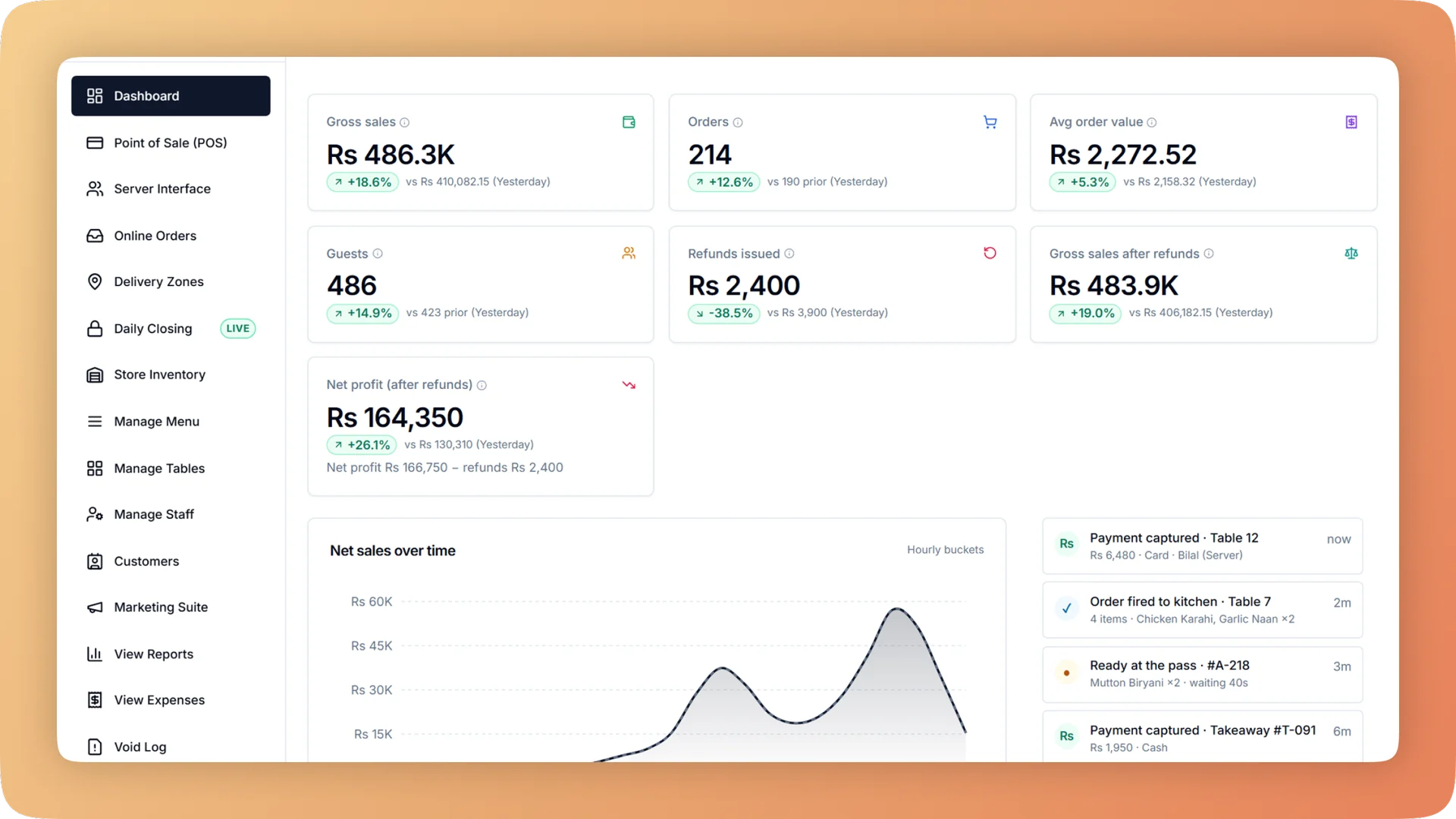
Expenses on a live shift.
Restaurant expense tracking with a profit and loss statement by hour, day, week or month. Record every bill once and click any total to see the rows behind it.
- Sales, cost of goods, running costs, stock purchases and the result for any period, on one screen
- A profit and loss statement by hour, day, week or month, compared with the previous period
- Cash taken from the drawer filed as an expense, a stock purchase or neither, so it is entered once
- Stock purchases are never counted as an expense twice
- Excel exports with a "Basis" sheet that defines every line for your accountant
What you get with Expenses.
- Where the money went, on one screen
- The expense overview shows sales, cost of goods, running costs, stock purchases and the result for the period you pick. Click any number to see the rows behind it.
- Profit and loss when you want it
- Gross sales down to net profit by hour, day, week or month, each compared with the previous period. Monthly profit is there on the first of the month.
- Petty cash with a paper trail
- Money taken from the drawer is recorded with a reason and filed as an expense, a stock purchase or neither. It appears in the cash-up and in the books from a single entry.
- A profit figure that deliveries cannot bend
- Stock becomes a cost when it sells, not when it is bought. One restaurant's day once showed a minus 78% margin only because a delivery had landed.
- Owner's eyes only
- Managers record bills but cannot open the profit and loss statement. The owner sees it, and the accountant gets a read-only login for reports, expenses and profit.
- Month-end in one file
- The month-end pack is one Excel workbook with every report, plus a full order audit export. A "Basis" sheet explains how each line was calculated.
Everything Expenses does.
Used by owners, accountants and managers.
Recording expenses
Bills are entered by the person in the building, on the day they are paid.
- Expense ledger
- Record each bill with its category, payee, payment method, reference and supplier.
- Expense categories
- The owner defines the categories: rent, salaries, utilities, repairs, or whatever the business needs.
- Cash in and cash out
- Every movement of drawer cash is recorded with a reason, and filed as an expense, a stock purchase or neither.
- Cash out linked to stock
- A cash-out for a stock purchase is tied to the stock it bought, so the same rupees are not entered as an expense as well.
- Supplier bills and payments
- What you owe suppliers is kept in Purchasing & Suppliers, where bills are confirmed and paid in full or part.
The expense overview
Five figures that explain a period, each one a click away from its detail.
- Overview for any period
- Sales, cost of goods, running costs, stock purchases and the result, for the dates you choose.
- Drill-down on every number
- Click a total to open the individual rows that make it up.
- Stock purchases on their own line
- Money spent on stock is shown separately from running costs, so you can see cash going into the storeroom.
- Stock buys are not counted twice
- Ingredients reach the profit figure through cost of goods when dishes sell. The purchase itself is never added again as an expense.
Profit and loss statement
The same statement at four zoom levels.
- Gross sales to net profit
- One statement runs from gross sales through cost of goods and running costs to net profit.
- By hour, day, week or month
- Read profit for a single lunch service or a whole month by switching the period.
- Compared with the previous period
- Each line sits next to the same line from the period before, so a change stands out.
- Hidden from managers
- Managers cannot open the profit and loss statement. It is for the owner and the accountant.
For your accountant
Access and files that answer the questions before they are asked.
- Accountant login
- A read-only login for reports, expenses and profit. The accountant can look at everything and change nothing.
- Exports with a "Basis" sheet
- Every Excel export includes a sheet that defines each line and how it was calculated.
- Month-end pack
- One Excel workbook containing every report for the month.
- Order audit export
- A full export of every order sits alongside the month-end pack, for checking any figure back to its bills.
“We were managing everything on paper and WhatsApp. Bhookly changed that in a single day. Our kitchen team actually wants to use it — which has never happened with any software before.”
Things people usually ask us.
Still have a question? Message us and we reply the same day.
Can I see my restaurant's actual profit, not only sales?
Yes. Bhookly's profit and loss statement runs from gross sales down to net profit, by hour, day, week or month, with each period compared to the one before. It uses the expenses you record and the cost of the dishes sold.
How do I track restaurant expenses like rent, salaries and utilities?
Record each bill in Bhookly's expense ledger with a category, payee, payment method, reference and supplier. The owner defines the categories, and the expense overview totals them against sales for any period.
Can my manager record expenses without seeing the profit?
Yes. In Bhookly, managers record bills and cash movements but cannot see the profit and loss statement. Only the owner and the accountant can open it.
How is cash taken from the till for expenses recorded?
In Bhookly, money taken from the drawer is recorded with a reason and filed as an expense, a stock purchase or neither. The one entry reaches both the nightly cash count and the books, so petty cash is explained without double entry.
Does a stock purchase show up as an expense?
No. Bhookly never counts a stock purchase as an expense twice: stock becomes a cost when it sells. One restaurant's day once showed a minus 78% margin only because a delivery landed, and this rule is what prevents it.
Can I give my accountant access to the numbers?
Yes. Bhookly has a read-only accountant login covering reports, expenses and profit. The accountant can also take the month-end pack, one Excel workbook with every report and a full order audit export.
Will my accountant understand how the figures were calculated?
Yes. Every Excel export from Bhookly includes a "Basis" sheet that defines each line. The accountant can read how a number was worked out without calling you.
Can I track expenses for more than one branch?
Yes. Bhookly tracks expenses for each location, so you can see profit by branch and compare one against another.
Works with the rest of Bhookly
Let's get your restaurant running on Bhookly.
چلیں، شروع کریں
Book a 20-minute demo. We'll show you Bhookly running on your kind of restaurant, with no pressure and no obligation.
- No lock-in contracts
- Live in a morning
- Same-day WhatsApp support