POS software for dhabas and desi restaurants in Rawalpindi.
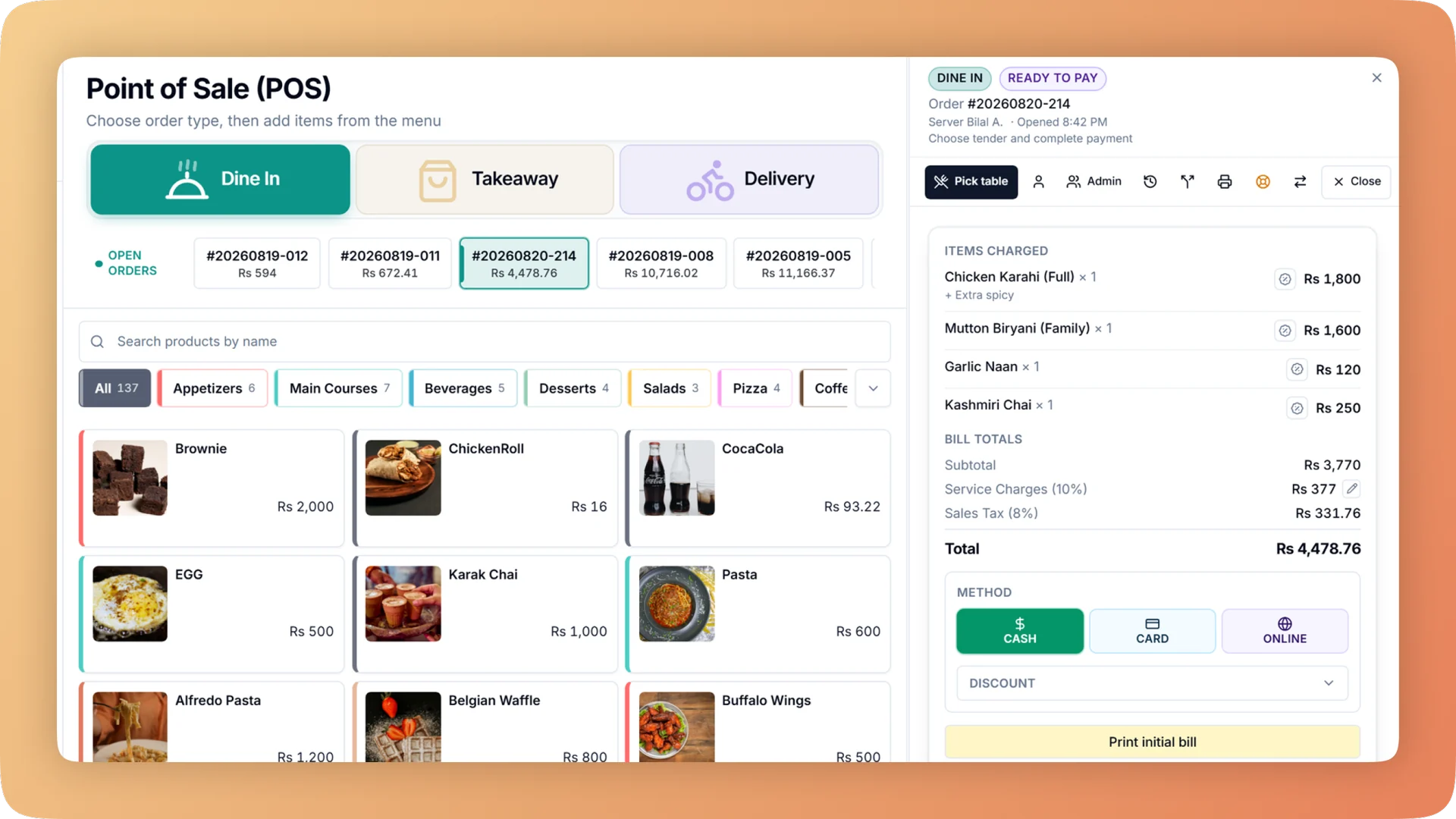
Bhookly is POS software for dhabas and desi restaurants in Rawalpindi, whether the menu is karahi, BBQ or desi breakfast. Bhookly gives dhabas and desi restaurants a simple one-screen till, selling that carries on through an internet cut, and a nightly close that shows whether the cash is short and who was on it.
Where dhabas and desi restaurants trade in Rawalpindi.
Rawalpindi's food is bustling and value-driven, from the historic dhabas and karahi spots around Raja Bazaar and Commercial Market to newer cafés in Bahria Town and Saddar. Volume, cash handling and quick service define the trade here, often right alongside Islamabad's premium crowd.
- Food neighbourhoods in Rawalpindi
- Saddar
- Bahria Town
- Commercial Market
- Raja Bazaar
- Chaklala
- Satellite Town
What goes wrong for dhabas and desi restaurants in Rawalpindi.
- High-volume cash, late into the night, and no way to know if the drawer is right.
- Internet cuts and load-shedding in the middle of dinner.
- Software with more screens than the staff have time to learn.
- Cash taken from the drawer "for the market" with nothing written down.
- Kitchen slips nobody can read through the smoke.
- Sales after midnight landing in tomorrow's report.
A dhaba night on Bhookly: no sale can be rung until someone declares the cash in the drawer. The cashier bills with quick-keys for BBQ, karahi and roti on one screen. When the internet drops, the Windows and Android apps keep taking orders, printing tickets and taking payment, and sync later. The tandoor and the grill each get their own slip, with big quantities, options on their own lines and notes flagged. Money taken out of the drawer is recorded with a reason. The business day can start at 5 AM, so the 2 AM tables belong to the same night. At close, the manager counts cash, card and online one step at a time, and each step says whether it matches, is short or is over.
What dhabas and desi restaurants in Rawalpindi run on Bhookly
Point of Sale
A restaurant POS with one screen from order to payment: split a bill between 2 and 30 guests, hold orders, apply bank card deals and keep selling offline.
Daily Closing
Open on a declared float, count cash, card and online step by step, and get a numbered Z report showing tonight's shortage and the shift it belongs to.
Kitchen Display System
Every cook sees their own tickets, and late ones turn red. Run a kitchen display, printed KOT slips, or a mix per station, from one order at the till.
Reports & Analytics
Sales, margin, tax, refunds and profit and loss for any period and every branch. Click a total to see the bills behind it, then export it all for your accountant.
Offline Mode
When the internet drops, Bhookly's Windows and Android apps keep taking orders, printing kitchen tickets and taking payment, then sync when it returns.
Void Log
Every void needs a reason and a manager PIN, and lands in a permanent log: who voided, who approved, why, the value and whether the food was made.
Expenses
Restaurant expense tracking with a profit and loss statement by hour, day, week or month. Record every bill once and click any total to see the rows behind it.
- Everything Bhookly does for dhabas and desi restaurants
Simple, fast billing for dhabas, with the cash counted every night.
Things people usually ask us.
Still have a question? Message us and we reply the same day.
Can I stop staff voiding items after the food has gone out?
Yes. In Bhookly voiding an item already sent to the kitchen needs a reason and a manager PIN, and prints "DO NOT MAKE" at the station. Every void is kept in a log with who voided, who approved and the value.
Will it work when the internet goes out?
Yes. Bhookly's Windows and Android apps keep taking orders, printing kitchen tickets and taking payment through an internet cut. Orders carry a temporary code and sync when the connection is back.
Is it simple enough for a busy dhaba?
Yes. Bhookly's till is one screen: the menu on the left, the live ticket and payment on the right, with quick-keys for your fastest sellers. Daily cash reconciliation is built in.
How do I know if the cash is short at the end of the night?
Bhookly's guided day close has the manager count cash, card and online one step at a time. Each step shows the working and a verdict: matches, short or over. A count cannot be skipped, and a big difference needs a written note.
Is Bhookly suitable for a busy Rawalpindi karahi spot?
Yes — quick-keys, offline billing and daily cash reconciliation keep high-volume desi spots moving fast.
Does it work across Rawalpindi and Islamabad branches?
Yes, manage branches in both cities from one login with a consolidated dashboard.
POS software for dhabas and desi restaurants in other cities
See Bhookly set up for dhabas and desi restaurants in Rawalpindi.
چلیں، شروع کریں
Book a 20-minute demo. We'll show you Bhookly running on your kind of restaurant, with no pressure and no obligation.
- No lock-in contracts
- Live in a morning
- Same-day WhatsApp support