Kitchen Display System for QSR and fast-food outlets.
Kitchen Display System is built into Bhookly for QSR and fast-food outlets, alongside FBR and PRA filing at payment, bank card deals at checkout, and a business day that can start at 5 AM so sales after midnight stay in the same trading day.
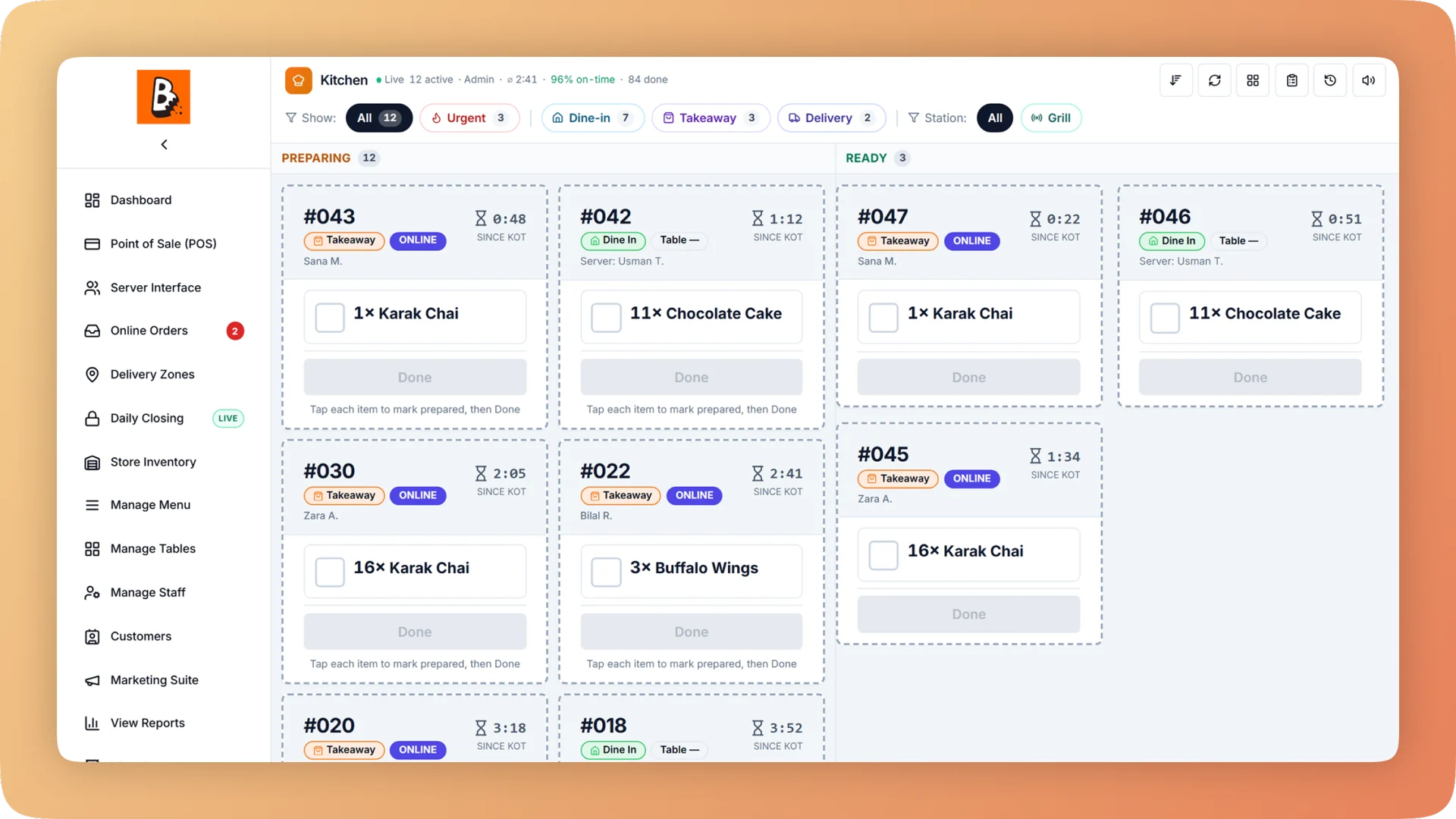
What Kitchen Display System does for your qsr & fast food.
- Late tickets are visible from across the kitchen
- Each ticket runs green, amber, red, then flashing against a target prep time you set for dine-in, takeaway and delivery separately. The clock starts when the order is fired, not when the tab was opened, so the colour tells the truth.
- One order, every station
- Assign menu categories to stations and one order splits itself: drinks to the bar, food to the grill. Each cook sees and bumps only their own dishes, the last station completes the order, and the expo view shows which station is holding up a table.
- Screen, paper, or both
- A small single-station kitchen can run on a thermal printer alone. A multi-station kitchen with a heavy delivery mix gets more from screens. Bhookly does either per station on the same system, so many kitchens run a display on the main line and keep a printer at packaging.
- Cook in batches, not ticket by ticket
- The all-day panel totals every unmade item across all tickets, for example "6 wings working". Grill and fry cooks drop the right quantity once instead of reading every card.
- Changes reach the cook
- A new ticket chimes and carries a NEW badge. Items added to a ticket already on the board raise a separate alert, and a voided item stays on the card, struck through with a VOIDED badge, so nobody cooks food that will not be paid for.
- The recipe is on the ticket
- A cook taps Recipe on any dish and reads the ingredients and numbered steps at the quantity ordered. New hires cook the dish the same way without the head chef standing beside them.
Built for how QSR and fast-food outlets actually run.
- Full Kitchen Display System overview
Every cook sees their own tickets, and late ones turn red. Run a kitchen display, printed KOT slips, or a mix per station, from one order at the till.
- Bhookly for QSR and fast-food outlets
A fast-food till that keeps the queue moving.
- The counter becomes the bottleneck in every rush.
- An order punched twice gets cooked twice. One restaurant counted 17 duplicate orders in 60 days.
- Cooks read every ticket to work out how many burgers are on order.
- Dine-in, takeaway and delivery all land at once, each with a different promise on time.
- Drink slips print in the kitchen and food slips at the drinks counter.
- Delivery platforms take a commission on every order.
More of what QSR and fast-food outlets run on
Point of Sale for QSR and fast-food outlets
A restaurant POS with one screen from order to payment: split a bill between 2 and 30 guests, hold orders, apply bank card deals and keep selling offline.
Menu Management for QSR and fast-food outlets
One menu runs the till, kitchen, QR menu, ordering website and WhatsApp. Set sizes, add-ons and deals once, and mark a dish sold out everywhere in one tap.
Reports & Analytics for QSR and fast-food outlets
Sales, margin, tax, refunds and profit and loss for any period and every branch. Click a total to see the bills behind it, then export it all for your accountant.
Things people usually ask us.
Still have a question? Message us and we reply the same day.
Is a KDS better than a KOT printer?
Not for every kitchen. A kitchen display is better with two or more stations or a heavy delivery and takeaway mix, because it adds timers, colour warnings and routing; a KOT printer is enough for a small kitchen with a short menu. Bhookly runs either one, or a mix per station, on the same system.
Can I use a KOT printer and a kitchen display in the same kitchen?
Yes. Bhookly lets you choose a screen, printed tickets or both for each station. Many kitchens run a display on the main line and keep a printer at the packaging or cold station.
Does the kitchen keep getting orders if the internet goes down?
Yes. In the Bhookly Windows and Android apps the till keeps printing kitchen tickets during an internet cut, stamped "OFFLINE - NOT SYNCED", and orders sync when the connection returns. The kitchen display shows Live or Offline and catches up by itself once it reconnects.
How does the kitchen know an order is running late?
Every ticket on the Bhookly kitchen display carries a timer that turns green, amber, red and then flashes against a target prep time. You set separate targets for dine-in, takeaway and delivery, and the clock starts when the order is sent to the kitchen.
Can different stations see only their own items?
Yes. In Bhookly you create stations, assign menu categories to each, and give each station its own screen or printer. A cook sees and clears only that station's dishes, and the expo view shows how many stations are ready for each ticket.
What happens on the kitchen screen when an item is voided or added?
The kitchen is told straight away. In Bhookly a voided item stays on the ticket, struck through with a VOIDED badge, and a paper station prints a "DO NOT MAKE" slip. Items added to an open ticket raise their own alert so they are not missed.
Can cooks see the recipe on the kitchen display?
Yes. Every dish on a Bhookly kitchen ticket has a Recipe button showing ingredients and numbered steps, scaled to the quantity ordered. Prices are never shown on the kitchen screen.
Does the KDS need its own device?
No special hardware is needed. The Bhookly kitchen display runs on any tablet or screen, you can run unlimited displays on the same restaurant account, and a USB bump bar or keyboard can drive the board without touching the screen.
Run kitchen display system on Bhookly.
چلیں، شروع کریں
Book a 20-minute demo. We'll show you Bhookly running on your kind of restaurant, with no pressure and no obligation.
- No lock-in contracts
- Live in a morning
- Same-day WhatsApp support