POS software for QSR and fast-food outlets in Multan.
Bhookly gives fast-food counters a one-screen till with keyboard shortcuts and duplicate-order protection, and a kitchen board with all-day counts and colour-coded timers. Bhookly staff set up QSR and fast-food outlets in Multan and load the menu for them, and each restaurant gets its own web address and its own database.
Where QSR and fast-food outlets trade in Multan.
Multan, the city of saints and mangoes, has a food culture rooted in rich desi flavours and famous sweets, alongside a growing café and fast-food scene around Cantt and Bosan Road. Restaurants balance traditional clientele with a younger, online-savvy crowd.
- Food neighbourhoods in Multan
- Cantt
- Bosan Road
- Gulgasht
- WAPDA Town
- Shah Rukn-e-Alam
What goes wrong for QSR and fast-food outlets in Multan.
- The counter becomes the bottleneck in every rush.
- An order punched twice gets cooked twice. One restaurant counted 17 duplicate orders in 60 days.
- Cooks read every ticket to work out how many burgers are on order.
- Dine-in, takeaway and delivery all land at once, each with a different promise on time.
- Drink slips print in the kitchen and food slips at the drinks counter.
- Delivery platforms take a commission on every order.
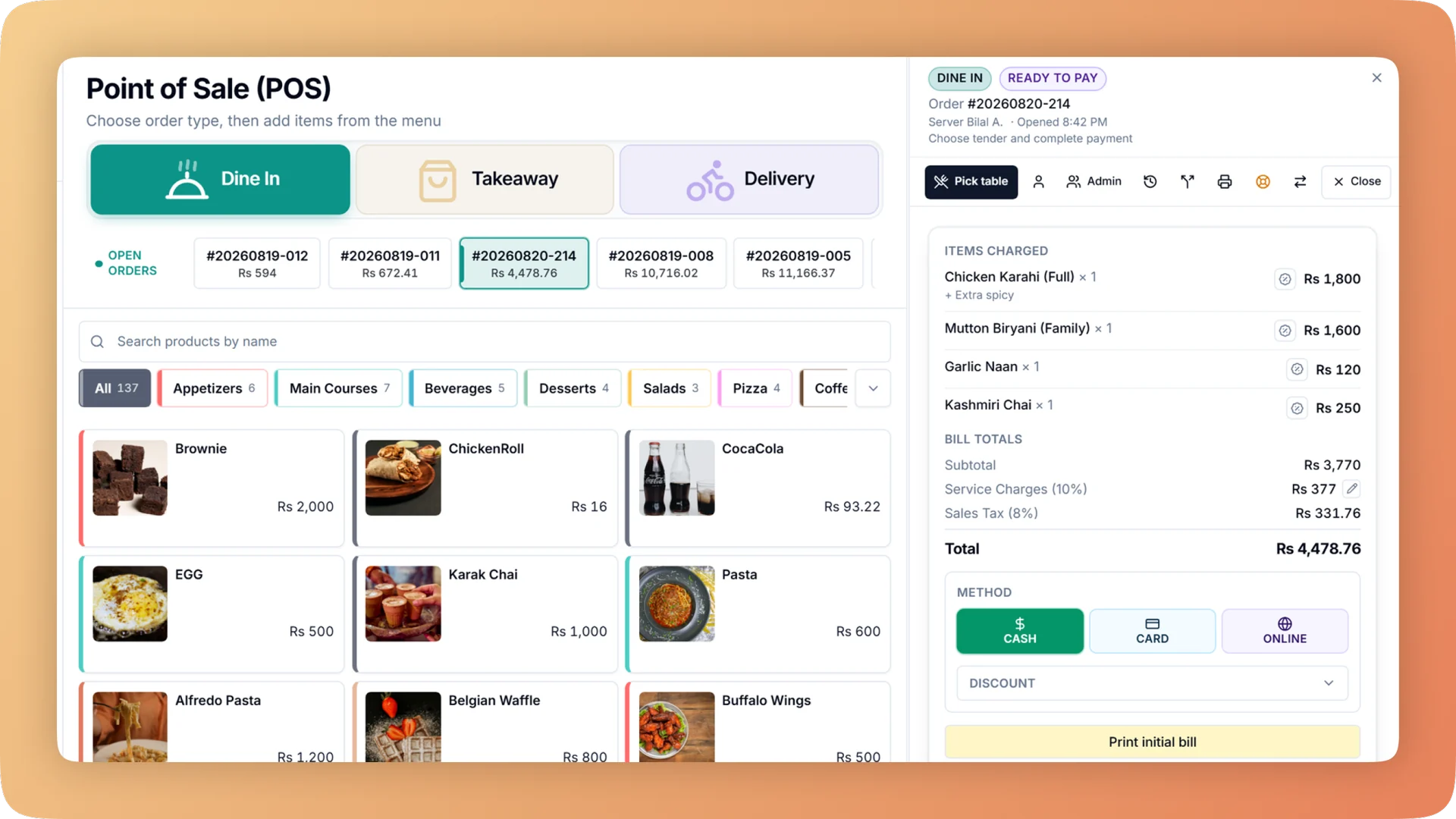
A lunch rush on Bhookly: the cashier finds any item by name, code or barcode, sends to the kitchen and takes payment without leaving one screen, using the keyboard if they prefer. Orders can also come from a self-order kiosk. Tickets land on the kitchen display in Preparing and Ready lanes, colour-coded and timed from the moment the order is fired. One panel totals every unmade item across all tickets, such as "6 wings working", so cooks batch instead of reading each ticket. Each station prints on its own printer or shows on its own screen. Dine-in, takeaway and delivery each have their own prep target, and your branded app brings in online orders without commission.
What QSR and fast-food outlets in Multan run on Bhookly
Point of Sale
A restaurant POS with one screen from order to payment: split a bill between 2 and 30 guests, hold orders, apply bank card deals and keep selling offline.
Kitchen Display System
Every cook sees their own tickets, and late ones turn red. Run a kitchen display, printed KOT slips, or a mix per station, from one order at the till.
Menu Management
One menu runs the till, kitchen, QR menu, ordering website and WhatsApp. Set sizes, add-ons and deals once, and mark a dish sold out everywhere in one tap.
Reports & Analytics
Sales, margin, tax, refunds and profit and loss for any period and every branch. Click a total to see the bills behind it, then export it all for your accountant.
Offline Mode
When the internet drops, Bhookly's Windows and Android apps keep taking orders, printing kitchen tickets and taking payment, then sync when it returns.
Daily Closing
Open on a declared float, count cash, card and online step by step, and get a numbered Z report showing tonight's shortage and the shift it belongs to.
Online Ordering Website
Your own commission-free ordering website in one of twelve designs, with delivery zones, live order tracking and one inbox that sends every order to the kitchen.
- Everything Bhookly does for QSR and fast-food outlets
A fast-food till that keeps the queue moving.
Things people usually ask us.
Still have a question? Message us and we reply the same day.
Can a cashier ring a sale without the mouse?
Yes. Bhookly has keyboard shortcuts for send to kitchen, pay, discount and search, so a full sale runs from the keyboard. Search covers the whole menu by name, code or barcode, whichever category is open.
How does Bhookly stop duplicate orders in a rush?
In Bhookly a double tap or a retry can only ever create one order. A double click cannot print two kitchen tickets either, and a cancelled order can never print one. One restaurant had 17 duplicate orders in 60 days before this protection.
What are all-day counts on a kitchen display?
All-day counts total every unmade item across all open tickets. Bhookly shows them in one panel, for example "6 wings working", so grill and fry cooks batch their cooking and stop reading every ticket.
How does the kitchen know which orders are late?
Every ticket on Bhookly's kitchen display runs a colour-coded timer: green, amber, red, then flashing, against a target prep time. The clock starts when the order is fired, and a strip shows the last 24 hours of average prep time and tickets finished on time.
Can a Multan sweet shop sell by weight on Bhookly?
Yes — weight-based and per-piece billing make Bhookly a great fit for sweet shops and bakeries.
Will Bhookly work if the internet drops in Multan?
Yes, core billing and kitchen features keep running offline and sync when you reconnect.
POS software for QSR and fast-food outlets in other cities
See Bhookly set up for QSR and fast-food outlets in Multan.
چلیں، شروع کریں
Book a 20-minute demo. We'll show you Bhookly running on your kind of restaurant, with no pressure and no obligation.
- No lock-in contracts
- Live in a morning
- Same-day WhatsApp support