Best POS for restaurants in Pakistan
The best POS for a restaurant in Pakistan is the one that passes seven tests in the demo: it sells through an internet cut, makes the manager count the money every night, logs every void, files with the tax authority, shows what each plate earns, runs the kitchen and brings guests back. Feature lists all look the same, so do not read them. Ask the salesperson to show you each of the things below on a live screen, and see how Bhookly answers each one.
What to look for
Pull the internet cable during the demo
Ask them to take an order, send it to the kitchen and take payment with the cable out. Then plug it back in and ask where that order went. In Bhookly's Windows and Android apps the order, the kitchen ticket and the payment all go through; the ticket prints stamped as not yet synced, and any price difference found on sync goes to a manager queue instead of becoming a mystery shortage.
Ask to see the day close
Does it make the manager count cash, card and online separately, and show short or over for each? Can a count be skipped? Bhookly's close goes one step at a time, shows the working and a verdict for each payment type, refuses a skipped count and asks for a written note on a big difference. Tomorrow cannot start until today is closed.
Void an item that has gone to the kitchen
Watch what the system asks for and where the void shows up afterwards. Bhookly asks for a reason and a manager PIN, prints “DO NOT MAKE” at the station, and writes the void to a log that cannot be edited or deleted, with who voided and who approved.
Ask what a plate earns
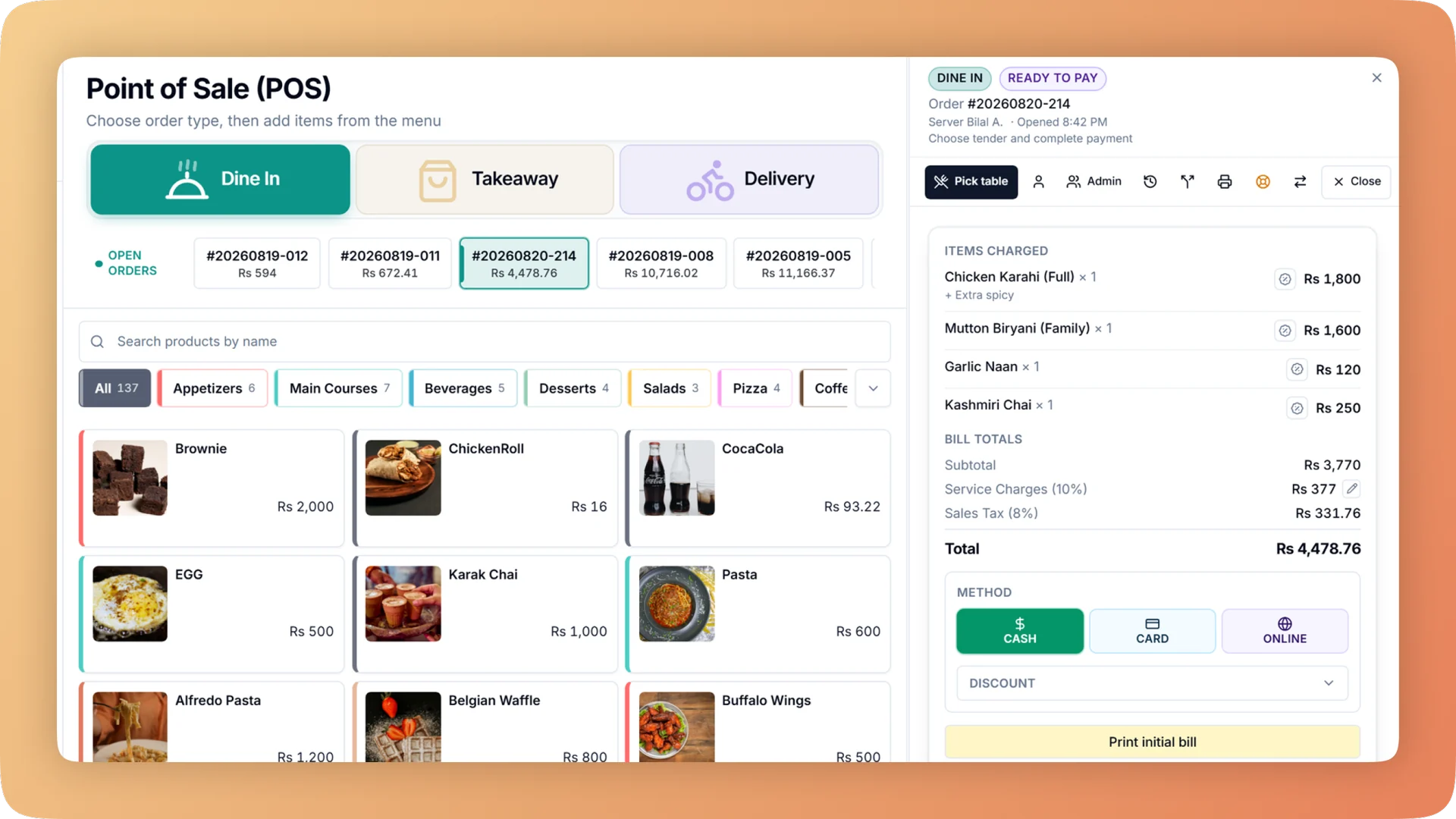
Pick one dish and ask for its cost, profit and margin, then ask whether the takeaway box is in that number. Bhookly shows all three for every item, costs the box, cup or bag only when the order leaves, and flags the dishes that need attention.
Ring a sale and read the receipt
For a registered restaurant, the receipt should carry the tax authority's invoice number and QR. Ask what happens when the authority's server is down. Bhookly files with FBR, PRA and KPRA at payment; if the authority is down the sale still completes and the filing retries, never twice.
Stand in the kitchen
Ask how a cook knows a ticket is late, and how the grill sees only grill items. Bhookly's kitchen display gives each station its own board, runs each ticket green, amber then red against a target time, and totals every unmade item in an all-day count. A paper kitchen can use printed tickets instead, per station.
Ask who owns the customer list
Ask to see one guest's profile and how the system brings a lapsed guest back. Bhookly builds one directory from till orders, online orders and loyalty sign-ups, labels each guest New, Active, At risk, Lapsed or VIP every night, and runs eight automations, including a win-back after 60 days.
Why Bhookly fits
- Sells through an internet cut in the Windows and Android apps: orders, kitchen tickets and payment
- A guided nightly close of cash, card and online, with void, day-close and tax logs that cannot be edited
- Margin on every dish, with takeaway packaging costed and stock deducted as dishes sell
- Fiscal invoicing with FBR, PRA and KPRA, filed at payment
- A kitchen display with station boards and timers, or printed tickets, or a mix
- Your own ordering website, table QR ordering and WhatsApp ordering in one inbox on the till
- From Rs 10,000/mo, no contract, set up for you by Bhookly's team
Things people usually ask us.
Still have a question? Message us and we reply the same day.
What's the best restaurant POS in Pakistan?
The best restaurant POS in Pakistan is the one that keeps selling when the internet drops, makes someone count the money every night and tells you what each plate earns. Bhookly is built around those three: its Windows and Android apps sell through a cut, its guided day close counts cash, card and online separately, and every dish shows its cost and margin.
How much does a restaurant POS cost in Pakistan?
Bhookly starts from Rs 10,000/mo, billed monthly with no setup fee. Growth (Rs 15,000/mo) adds a branded iOS & Android app, WhatsApp AI ordering, rider tracking and customer WhatsApp promos. Cancel anytime.
Does a POS work during load-shedding or without internet?
It depends on the POS, so test it in the demo by pulling the cable. Bhookly's Windows and Android apps keep taking orders, printing kitchen tickets and taking payment through an internet cut, then sync when the connection returns, and the day cannot be closed while food sent during the cut is unbilled.
Which POS is FBR and PRA integrated in Pakistan?
Bhookly's fiscal invoicing works with FBR, PRA and KPRA. Each sale is filed at the moment of payment and the receipt carries the official number and QR, with no separate software.
How do I stop staff from giving free food or discounts?
Choose a POS that puts a manager PIN and a permanent record on the risky actions. In Bhookly, voiding a sent item needs a reason and a manager PIN, a full comp of an item needs a PIN, waiters cannot take payment, discount or cancel, only one discount applies per bill, and the void log flags voids approved by the same person who made them.
What should I ask in a POS demo?
Ask to see the day close, a void, an offline sale, a dish's margin and a tax receipt, on a live screen and not a slide. Bhookly's demo covers all five, and the guide above lists what a good answer looks like for each.
More buyer's guides
Let's get your restaurant running on Bhookly.
چلیں، شروع کریں
Book a 20-minute demo. We'll show you Bhookly running on your kind of restaurant, with no pressure and no obligation.
- No lock-in contracts
- Live in a morning
- Same-day WhatsApp support