Online Ordering Website for cloud kitchens.
For cloud kitchens, Online Ordering Website sits behind Bhookly's staff controls. Each person has their own login, each of the eight job roles sees only its own screens, and voids, refunds and full comps need a manager PIN.
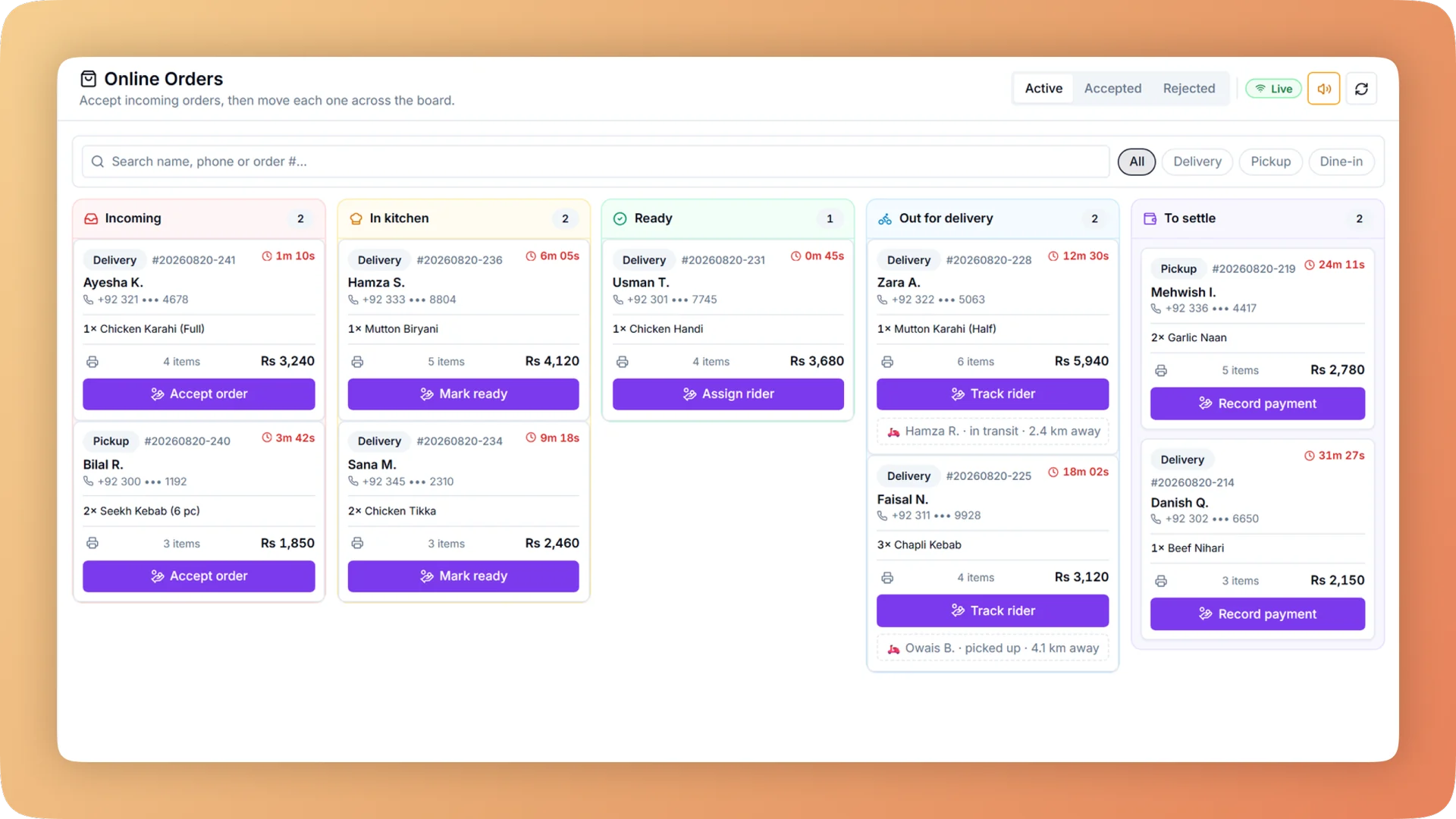
What Online Ordering Website does for your cloud kitchen.
- A site that looks made for your food
- Counter, Bakery, Dhaba, Roastery, Night, Fresh, Heritage, Atelier, Pop, Shelf, Docket and Bistro. Each of the twelve designs is a complete art direction for a kind of restaurant, not the same page in a different colour. A bakery, a burger counter and a fine-dining room each get a site that looks like it was drawn for them.
- Live in a day, with no developer
- The Website page puts your real site beside the controls. Change a colour, a font or a hero style and the preview restyles at once, on phone and desktop, in light and dark. Nothing reaches customers until you press Save. Bhookly's team sets the restaurant up and loads the menu, so the site can be taking orders the day you choose a design.
- Customers see the fee before they build a basket
- On arrival the customer chooses delivery or takeaway and their area, by list or by GPS, and sees the delivery fee and time straight away. On delivery orders they drop a pin on a map, so the rider navigates to a point and not to a vague address. Visitors outside your zones are told at the start, not at checkout.
- One inbox on the till, not another tablet
- Website orders arrive in the same inbox as table QR and WhatsApp orders, with a chime that repeats until someone answers. Accept fires the order to the right kitchen stations. Reject sends the customer the reason. Nobody re-keys an order from one screen into another.
- Tracking driven by the kitchen, not a guess
- Each order has a private link showing Placed, Confirmed, Preparing, Ready or Out for delivery. The stages move when your staff accept the order and when the cook marks it done on the kitchen display. The customer also gets received, confirmed and ready emails carrying the same link.
- You keep the customer, not the marketplace
- There is no commission on an order placed through your own site, and the person who placed it is added to your customer directory with their visits and spend. That is the list delivery marketplaces withhold, and the one your win-back campaigns and loyalty card run on.
Built for how cloud kitchens actually run.
- Full Online Ordering Website overview
Your own commission-free ordering website in one of twelve designs, with delivery zones, live order tracking and one inbox that sends every order to the kitchen.
- Bhookly for cloud kitchens
Cloud kitchen software with your own ordering website.
- Marketplace commission takes a large slice of every delivery order.
- The delivery app knows your customers. You do not.
- Boxes, bags and cutlery are never counted in the cost of a dish.
- A tablet per channel, and orders re-keyed by hand between them.
- Delivery-app payouts never quite match what the till says was sold.
- "Where is my order?" calls in the middle of a rush.
More of what cloud kitchens run on
Kitchen Display System for cloud kitchens
Every cook sees their own tickets, and late ones turn red. Run a kitchen display, printed KOT slips, or a mix per station, from one order at the till.
Recipe Costing for cloud kitchens
Recipe costing software for restaurants: see price, cost, profit and margin on every dish, with the food cost per plate worked out line by line.
Store Inventory for cloud kitchens
Restaurant inventory management that deducts ingredients as each bill is paid, turns every count gap into a money figure and suggests what to reorder.
Things people usually ask us.
Still have a question? Message us and we reply the same day.
Does Bhookly charge commission on online orders?
No. Bhookly charges no commission on orders placed through your own ordering website. Delivery marketplaces typically take 25 to 35% of each order; an order on your Bhookly site goes to your till in full, and the customer goes into your own customer directory.
How long does it take to launch a restaurant ordering website?
A Bhookly ordering website can be live in a day. Bhookly's team sets up the restaurant and loads the menu, you choose one of twelve designs, adjust it in the live preview and press Save. There is no developer to brief and no build to wait for.
What do the website designs look like?
Bhookly has twelve designs: Counter, Bakery, Dhaba, Roastery, Night, Fresh, Heritage, Atelier, Pop, Shelf, Docket and Bistro. Each is a full art direction for a type of restaurant, and each can be fine-tuned with 26 fonts, 12 hero styles, 8 menu layouts and your own colours and photos. Text contrast is worked out automatically, so the site stays readable.
Where do online orders show up?
Online orders arrive in the orders inbox on the Bhookly till with a repeating chime. Accept sends the order to the kitchen display or kitchen printer; Reject sends the customer a reason. Website, table QR and WhatsApp orders share the same inbox, so there is no extra tablet per channel.
Can I set different delivery charges for different areas?
Yes. In Bhookly you draw delivery zones on a map and give each zone its own charge, minimum order, delivery time and rider payout. Customers see the fee and time for their area before they build a basket, and addresses outside every zone are told early.
Can customers track their order?
Yes. Every Bhookly online order has a private tracking link showing Placed, Confirmed, Preparing, Ready or Out for delivery. The stages follow what staff and cooks actually do, and the customer also gets emails when the order is received, confirmed and ready.
Do customers have to create an account or download an app?
No. Customers can check out as a guest on a Bhookly ordering website, confirming the order with a one-time code sent by email. Those who want to can create an account for saved addresses, favourites and past orders, or add the site to their home screen as an app with your restaurant's icon.
How do customers pay for online orders?
Customers on a Bhookly ordering website can pay online or pay in cash on delivery or at pickup. Each order is recorded under its payment type, so the nightly close counts cash, card and online separately.
Run online ordering website on Bhookly.
چلیں، شروع کریں
Book a 20-minute demo. We'll show you Bhookly running on your kind of restaurant, with no pressure and no obligation.
- No lock-in contracts
- Live in a morning
- Same-day WhatsApp support